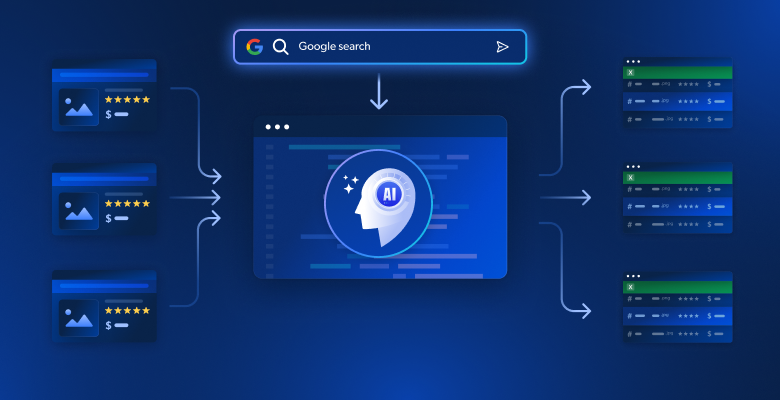
수십 개의 구글 검색 결과를 수동으로 조사하는 것은 시간이 너무 많이 소요되며, 여러 출처에 흩어진 핵심 통찰력을 놓치는 경우가 많습니다. 기존의 웹 스크래핑은 원시 HTML을 제공하지만 정보를 일관된 서사로 종합할 수 있는 지능이 부족합니다. 이 가이드는 구글 검색 결과 페이지(SERP)를 자동으로 스크래핑하고, 임베딩을 사용하여 콘텐츠를 분석하며, 포괄적인 기사나 개요를 생성하는 AI 기반 시스템을 구축하는 방법을 보여줍니다.
배울 내용:
- Bright Data와 벡터 임베딩을 활용한 자동화된 연구-기사 파이프라인 구축 방법
- 스크래핑된 콘텐츠를 의미론적으로 분석하고 반복되는 주제를 식별하는 방법
- LLM을 활용한 구조화된 개요 및 전체 기사 생성 방법
- 콘텐츠 생성을 위한 인터랙티브 Streamlit 인터페이스 구축 방법
시작해 보세요!
콘텐츠 제작을 위한 연구의 어려움
콘텐츠 제작자는 기사, 블로그 게시물 또는 마케팅 자료를 위한 주제를 연구할 때 상당한 장애물에 직면합니다. 수동 연구에는 수십 개의 브라우저 탭을 열고, 긴 기사를 읽으며, 서로 다른 출처의 정보를 종합하려는 시도가 포함됩니다. 이 과정은 인적 오류가 발생하기 쉽고, 시간이 많이 소요되며, 확장하기 어렵습니다.
BeautifulSoup이나 Scrapy를 활용한 기존 웹 스크래핑 방식은 원시 HTML 텍스트를 제공하지만, 콘텐츠 맥락을 이해하거나 핵심 주제를 식별하거나 여러 출처의 정보를 종합하는 지능이 부족합니다. 그 결과 여전히 상당한 수동 처리가 필요한 비구조화된 텍스트 모음이 생성됩니다.
Bright Data의 강력한 스크래핑 기능과 벡터 임베딩, 대규모 언어 모델 같은 현대적 AI 기술을 결합하면 연구에서 기사 작성까지의 전체 파이프라인을 자동화할 수 있습니다. 이는 수시간의 수작업이 자동화된 분석으로 단 몇 분 안에 전환되는 것을 의미합니다.
구축 중인 시스템: AI 기반 콘텐츠 연구 시스템
주어진 키워드에 대해 Google 검색 결과를 자동으로 스크래핑하는 지능형 콘텐츠 생성 시스템을 구축하게 됩니다. 이 시스템은 대상 웹 페이지에서 전체 콘텐츠를 추출하고, 벡터 임베딩을 활용해 정보를 분석하여 주제와 통찰력을 식별한 후, 직관적인 Streamlit 인터페이스를 통해 구조화된 기사 개요 또는 완성된 초안 기사를 생성합니다.
필수 조건
개발 환경을 다음 요구 사항으로 설정하세요:
- Python 3.9 이상
- Bright Data 계정: 가입 후 API 토큰 생성 (무료 체험 크레딧 제공)
- OpenAI API 키: 임베딩 및 LLM 접근을 위해 OpenAI 대시보드에서 키 생성
- Python 가상 환경: 종속성을 분리하여 관리합니다
- LangChain + 벡터 임베딩(FAISS): 콘텐츠 분석 및 저장을 처리합니다.
- Streamlit: 대화형 사용자 인터페이스를 제공하여 사용자가 도구를 활용할 수 있도록 합니다.
환경 설정
프로젝트 디렉터리를 생성하고 종속성을 설치합니다. 다른 Python 프로젝트와의 충돌을 피하기 위해 깨끗한 가상 환경을 설정하는 것으로 시작합니다.
python -m venv venv
# macOS/Linux: source venv/bin/activate
# Windows: venvScriptsactivate
pip install langchain langchain-community langchain-openai streamlit "crewai-tools[mcp]" crewai mcp python-dotenv
article_generator.py라는 새 파일을 생성하고 다음 임포트를 추가합니다. 이 라이브러리들은 웹 스크래핑, 텍스트 처리, 임베딩, 사용자 인터페이스를 처리합니다.
import streamlit as st
import os
import json
from dotenv import load_dotenv
from langchain.text_splitter import RecursiveCharacterTextSplitter
from langchain_openai import OpenAIEmbeddings, OpenAI
from langchain_community.vectorstores import FAISS
from mcp import StdioServerParameters
from crewai_tools import MCPServerAdapter

load_dotenv()
Bright Data 구성
환경 변수를 사용하여 API 자격 증명을 안전하게 저장하세요. 자격 증명을 저장할 .env 파일을 생성하여 민감한 정보를 코드와 분리하세요.
BRIGHT_DATA_API_TOKEN="your_bright_data_api_token_here"
BRIGHT_DATA_ZONE="your_serp_zone_name"
OPENAI_API_KEY="your_openai_api_key_here"
필요한 항목:
- Bright Data API 토큰: Bright Data 대시보드에서 생성
- SERP 스크래핑 영역: Google SERP용으로 구성된 새 웹 스크래퍼 영역 생성
- OpenAI API 키: 임베딩 및 LLM 텍스트 생성에 사용
article_generator.py에서 API 연결을 구성하세요. 이 클래스는 Bright Data의 스크래핑 인프라와의 모든 통신을 처리합니다.
class BrightDataScraper:
    def __init__(self):
        self.server_params = StdioServerParameters(
            command="npx",
            args=["@brightdata/mcp"],
            env={
                "API_TOKEN": os.getenv("BRIGHT_DATA_API_TOKEN"),
                "WEB_UNLOCKER_ZONE": "mcp_unlocker",
                "BROWSER_ZONE": "scraping_browser1",
            },
        )

    def scrape_serp(self, keyword, num_results=10):
        with MCPServerAdapter(self.server_params) as mcp_tools:
            try:
                if not mcp_tools:
                    st.warning("사용 가능한 MCP 도구가 없습니다")
                    return {'results': []}

                for tool in mcp_tools:
                    try:
                        tool_name = getattr(tool, 'name', str(tool))

                        if 'search_engine' in tool_name and 'batch' not in tool_name:
                            try:
                                if hasattr(tool, '_run'):
                                    result = tool._run(query=keyword)
                                elif hasattr(tool, 'run'):
                                    result = tool.run(query=keyword)
                                elif hasattr(tool, '__call__'):
                                    result = tool(query=keyword)
                                else:
                                    result = tool.search_engine(query=keyword)

                                if result:
                                    return self._parse_serp_results(result)
                            except Exception as method_error:
                                st.warning(f"{tool_name} 메서드 실패: {str(method_error)}")
                                continue

                    except Exception as tool_error:
                        st.warning(f"도구 {tool_name} 실패: {str(tool_error)}")
                        continue

                st.warning(f"검색 엔진 도구가 {keyword}를 처리할 수 없음")
                return {'results': []}

            except Exception as e:
                st.error(f"MCP 스크래핑 실패: {str(e)}")
                return {'results': []}

    def _parse_serp_results(self, mcp_result):
        """MCP 도구 결과를 예상 형식으로 파싱합니다."""
        if isinstance(mcp_result, dict) and 'results' in mcp_result:
        return mcp_result
        elif isinstance(mcp_result, list):
            return {'results': mcp_result}
        elif isinstance(mcp_result, str):
            return self._parse_html_search_results(mcp_result)
        else:
            try:
                parsed = json.loads(str(mcp_result))
                return parsed if isinstance(parsed, dict) else {'results': parsed}
            except:
                return {'results': []}

    def _parse_html_search_results(self, html_content):
        """HTML 검색 결과 페이지를 파싱하여 검색 결과를 추출합니다."""
        import re

        results = []
        link_pattern = r'<a[^>]*href="([^"]*)"[^>]*>(.*?)</a>'
        title_pattern = r'<h3[^>]*>(.*?)</h3>'

        links = re.findall(link_pattern, html_content, re.DOTALL)

        for link_url, link_text in links:
            if (link_url.startswith('http') and
                not any(skip in link_url for skip in [
                    'google.com', 'accounts.google', 'support.google',
                    '/search?', 'javascript:', '#', 'mailto:'
                ])):

                clean_title = re.sub(r'<[^>]+>', '', link_text).strip()

                if clean_title and len(clean_title) > 10:
                    results.append({
                        'url': link_url,
                        'title': clean_title[:200],
                        'snippet': '',
                        'position': len(results) + 1
                    })

                    if len(results) >= 10:
                        break

        if not results:
            specific_pattern = r'[(.*?)]((https?://[^)]+))'
            matches = re.findall(specific_pattern, html_content)

            for title, url in matches:
                if not any(skip in url for skip in ['google.com', '/search?']):
                    results.append({
                        'url': url,
                        'title': title.strip(),
                        'snippet': '',
                        'position': len(results) + 1
                    })

                    if len(results) >= 10:
                        break

        return {'results': results}
기사 생성기 구축
1단계: SERP 및 대상 페이지 스크래핑
시스템의 기반은 포괄적인 데이터 수집입니다. 먼저 Google SERP 결과를 추출하고, 해당 링크를 따라 가장 관련성 높은 출처에서 전체 페이지 콘텐츠를 수집하는 스크레이퍼를 구축해야 합니다.
class ContentScraper:
    def __init__(self):
        self.bright_data = BrightDataScraper()
        self.server_params = StdioServerParameters(
            command="npx",
            args=["@brightdata/mcp"],
            env={
                "API_TOKEN": os.getenv("BRIGHT_DATA_API_TOKEN"),
                "WEB_UNLOCKER_ZONE": "mcp_unlocker",
                "BROWSER_ZONE": "scraping_browser1",
            },
        )

    def extract_serp_urls(self, keyword, max_results=10):
        """Google SERP 결과에서 URL 추출"""
        serp_data = self.bright_data.scrape_serp(keyword, max_results)

        urls = []
        results_list = serp_data.get('results', [])

        for result in results_list:
            if 'url' in result and self.is_valid_url(result['url']):
                urls.append({
                    'url': result['url'],
                    'title': result.get('title', ''),
                    'snippet': result.get('snippet', ''),
                    'position': result.get('position', 0)
                })
            elif 'link' in result and self.is_valid_url(result['link']):
                urls.append({
                    'url': result['link'],
                    'title': result.get('title', ''),
                    'snippet': result.get('snippet', ''),
                    'position': result.get('position', 0)
                })

        return urls

    def is_valid_url(self, url):
        """이미지, PDF, 소셜 미디어 등 기사 외 URL을 걸러냅니다."""
        excluded_domains = ['youtube.com', 'facebook.com', 'twitter.com', 'instagram.com']
        excluded_extensions = ['.pdf', '.jpg', '.png', '.gif', '.mp4']

        return (not any(domain in url for domain in excluded_domains) and
                not any(ext in url.lower() for ext in excluded_extensions))

    def scrape_page_content(self, url, max_length=10000):
        """Bright Data MCP 도구를 사용하여 웹페이지에서 깨끗한 텍스트 콘텐츠를 추출합니다."""
        try:
            with MCPServerAdapter(self.server_params) as mcp_tools:
                if not mcp_tools:
                    st.warning("콘텐츠 스크래핑을 위한 MCP 도구가 없습니다")
                    return ""

                for tool in mcp_tools:
                    try:
                        tool_name = getattr(tool, 'name', str(tool))

                        if 'scrape_as_markdown' in tool_name:
                            try:
                                if hasattr(tool, '_run'):
                                    result = tool._run(url=url)
                                elif hasattr(tool, 'run'):
                                    result = tool.run(url=url)
                                elif hasattr(tool, '__call__'):
                                    result = tool(url=url)
                                else:
                                    result = tool.scrape_as_markdown(url=url)

                                if result:
                                    content = self._extract_content_from_result(result)
                                    if content:
                                        return self._clean_content(content, max_length)
                            except Exception as method_error:
                                st.warning(f"{tool_name} 메서드 실패: {str(method_error)}")
                                continue

                    except Exception as tool_error:
                        st.warning(f"{tool_name} 도구 {url} 처리 실패: {str(tool_error)}")
                        continue

                st.warning(f"스크래핑 도구가 {url}을 스크래핑하지 못했습니다: {url}")
                return ""

        except Exception as e:
            st.warning(f"{url} 스크래핑 실패: {str(e)}")
            return ""

    def _extract_content_from_result(self, result):
        """MCP 도구 결과에서 콘텐츠 추출"""
        if isinstance(result, str):
            return result
        elif isinstance(result, dict):
            for key in ['content', 'text', 'body', 'html']:
                if key in result and result[key]:
                    return result[key]
        elif isinstance(result, list) and len(result) > 0:
            return str(result[0])

        return str(result) if result else ""

    def _clean_content(self, content, max_length):
        """스크랩된 콘텐츠를 정리하고 포맷팅합니다."""
        if isinstance(content, dict):
            content = content.get('text', content.get('content', str(content)))

        if '<' in content and '>' in content:
            import re
            content = re.sub(r'<script[^>]*>.*?</script>', '', content, flags=re.DOTALL | re.IGNORECASE)
            content = re.sub(r'<style[^>]*>.*?</style>', '', content, flags=re.DOTALL | re.IGNORECASE)
            content = re.sub(r'<[^>]+>', '', content)

        lines = (line.strip() for line in content.splitlines())
        chunks = (phrase.strip() for line in lines for phrase in line.split("  "))
        text = ' '.join(chunk for chunk in chunks if chunk)

        return text[:max_length]
이 스크레이퍼는 분석에 유용한 텍스트 콘텐츠를 제공하지 않는 멀티미디어 파일 및 소셜 미디어 링크를 피하면서 기사 콘텐츠에 집중하기 위해 URL을 지능적으로 필터링합니다.
2단계: 벡터 임베딩 및 콘텐츠 분석
스크랩된 콘텐츠를 의미적 의미를 포착하고 지능적인 콘텐츠 분석을 가능하게 하는 검색 가능한 벡터 임베딩으로 변환합니다. 임베딩 프로세스는 텍스트를 기계가 이해하고 비교할 수 있는 수치적 표현으로 변환합니다.
class ContentAnalyzer:
    def __init__(self):
        self.embeddings = OpenAIEmbeddings(openai_api_key=os.getenv("OPENAI_API_KEY"))
        self.text_splitter = RecursiveCharacterTextSplitter(
            chunk_size=1000,
            chunk_overlap=200,
            separators=["nn", "n", ".", "!", "?", ",", " ", ""]
        )

    def process_content(self, scraped_data):
        """스크랩된 콘텐츠를 임베딩으로 변환하고 테마를 분석합니다."""
        all_texts = []
        metadata = []

        for item in scraped_data:
            if item['content']:
                chunks = self.text_splitter.split_text(item['content'])

                for chunk in chunks:
                    all_texts.append(chunk)
                    metadata.append({
                        'url': item['url'],
                        'title': item['title'],
                        'position': item['position']
                    })

        if not all_texts:
            raise ValueError("분석할 콘텐츠가 없습니다")

        vectorstore = FAISS.from_texts(all_texts, self.embeddings, metadatas=metadata)

        return vectorstore, all_texts, metadata

    def identify_themes(self, vectorstore, query_terms, k=5):
        """의미적 검색을 사용하여 주요 주제와 테마를 식별합니다."""
        theme_analysis = {}

        for term in query_terms:
            similar_docs = vectorstore.similarity_search(term, k=k)

            theme_analysis[term] = {
                '관련_문단': len(similar_docs),
                '핵심_문장': [doc.page_content[:200] + "..." for doc in similar_docs[:3]],
                '출처': list(set([doc.metadata['url'] for doc in similar_docs]))
            }

        return theme_analysis

    def generate_content_summary(self, all_texts, metadata):
        """스크랩된 콘텐츠의 통계적 요약 생성."""
        total_words = sum(len(text.split()) for text in all_texts)
        total_chunks = len(all_texts)
        avg_chunk_length = total_words / total_chunks if total_chunks > 0 else 0

        return {
            '총_출처': len(set(meta['url'] for meta in metadata)),
            '총_청크': total_chunks,
            '총_단어': total_words,
            '평균_청크_길이': round(avg_chunk_length, 1)
        }
분석기는 콘텐츠를 의미적 청크로 분할하고 지능적인 주제 식별 및 콘텐츠 합성을 가능하게 하는 검색 가능한 벡터 데이터베이스를 생성합니다.
3단계: LLM을 활용한 기사 또는 개요 생성
임베딩 분석에서 얻은 의미적 통찰력을 활용하여 정교하게 설계된 프롬프트를 통해 분석된 콘텐츠를 구조화된 출력물로 변환합니다. LLM은 연구 데이터를 받아 일관되고 잘 구조화된 콘텐츠를 생성합니다.
class ArticleGenerator:
    def __init__(self):
        self.llm = OpenAI(
            openai_api_key=os.getenv("OPENAI_API_KEY"),
            temperature=0.7,
            max_tokens=2000
        )

    def generate_outline(self, keyword, theme_analysis, content_summary):
        """연구 데이터를 기반으로 구조화된 기사 개요 생성"""

        themes_text = self._format_themes_for_prompt(theme_analysis)

        outline_prompt = f"""
        "{keyword}"에 대한 포괄적인 연구를 바탕으로 상세한 기사 개요를 작성하십시오.

        연구 요약:
        - {content_summary['total_sources']}개의 출처 분석
        - {content_summary['total_words']}단어의 콘텐츠 처리
        - 핵심 주제 및 통찰력 식별

        발견된 주요 주제:
        {themes_text}

        다음 구조로 개요 작성:
        1. 주목을 끄는 헤드라인
        2. 도입부 훅 및 개요
        3. 하위 섹션이 포함된 4-6개의 주요 섹션
        4. 핵심 요약을 포함한 결론
        5. 권장 행동 유도문

        명확한 계층 구조로 마크다운 형식 작성.
        """

        return self.llm(outline_prompt)

    def generate_full_article(self, keyword, theme_analysis, content_summary, target_length=1500):
        """완성된 기사 초안 생성."""

        themes_text = self._format_themes_for_prompt(theme_analysis)

        article_prompt = f"""
        광범위한 연구를 바탕으로 "{keyword}"에 관한 포괄적인 {target_length} 단어 분량의 글을 작성하세요.

        연구 기반:
        {themes_text}

        콘텐츠 요구사항:
        - 독자의 관심을 사로잡는 매력적인 서론
        - 명확한 섹션으로 구성된 체계적인 본문
        - 연구에서 도출된 구체적인 통찰과 데이터 포인트 포함
        - 전문적이고 정보성 있는 어조
        - 실행 가능한 핵심 요점이 담긴 강력한 결론
        - 소제목을 활용한 SEO 친화적 구조

        완성된 기사를 마크다운 형식으로 작성하세요.
        """

        return self.llm(article_prompt)

    def _format_themes_for_prompt(self, theme_analysis):
        """LLM 처리를 위한 테마 분석 포맷팅."""
        formatted_themes = []

        for theme, data in theme_analysis.items():
            theme_info = f"**{theme}**: {data['relevant_chunks']} 콘텐츠 섹션에서 발견됨n"
            theme_info += f"핵심 통찰: {data['key_passages'][0][:150]}...n"
            theme_info += f"출처: {len(data['sources'])} 고유 참조n"
            formatted_themes.append(theme_info)

        return "n".join(formatted_themes)
이 생성기는 두 가지 별개의 출력 형식을 생성합니다: 콘텐츠 기획을 위한 구조화된 개요와 즉시 게시 가능한 완성된 기사입니다. 두 출력 모두 스크랩된 콘텐츠의 의미 분석을 기반으로 합니다.
4단계: Streamlit UI 구축
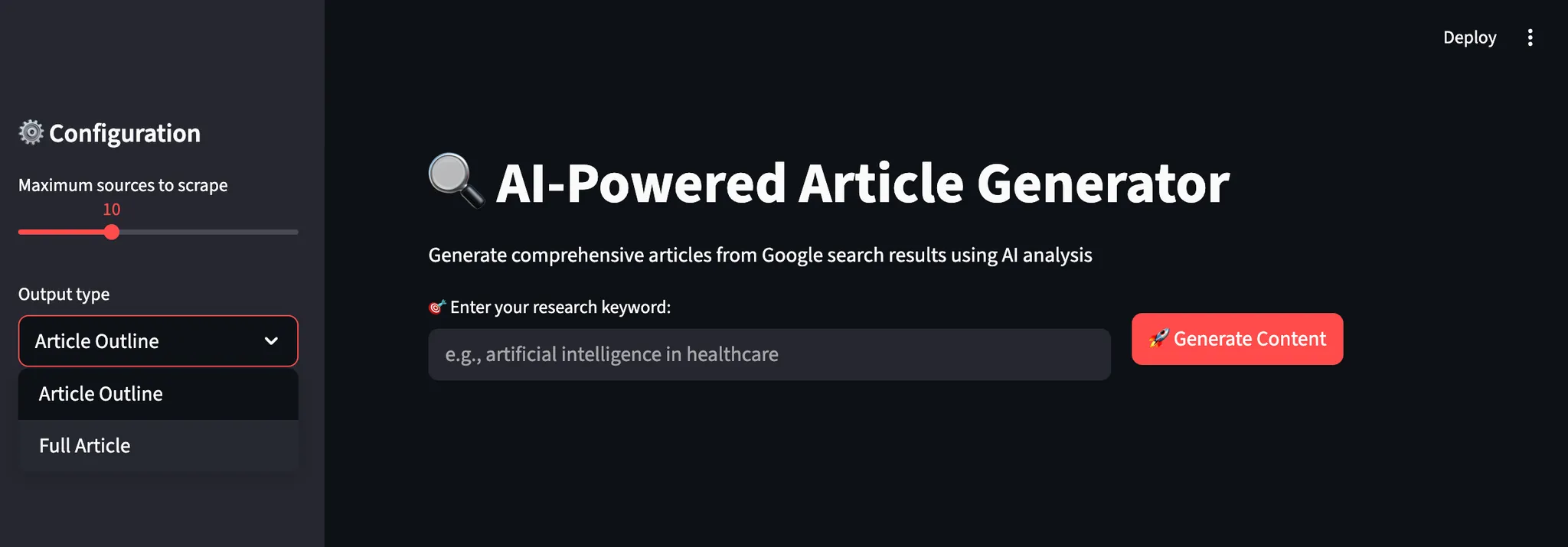
실시간 피드백과 맞춤 설정 옵션을 통해 콘텐츠 생성 워크플로를 안내하는 직관적인 인터페이스를 만듭니다. 이 인터페이스는 비기술적 사용자도 복잡한 AI 작업을 쉽게 이용할 수 있게 합니다.
def main():
    st.set_page_config(page_title="AI Article Generator", page_icon="📝", layout="wide")

    st.title("🔍 AI 기반 기사 생성기")
    st.markdown("AI 분석을 통해 Google 검색 결과로부터 포괄적인 기사 생성")

    scraper = ContentScraper()
    analyzer = ContentAnalyzer()
    generator = ArticleGenerator()

    st.sidebar.header("⚙️ 구성")
    max_sources = st.sidebar.slider("스크래핑할 최대 소스 수", 5, 20, 10)
    output_type = st.sidebar.selectbox("출력 형식", ["기사 개요", "전체 기사"])
    target_length = st.sidebar.slider("목표 단어 수 (전체 기사)", 800, 3000, 1500)

    col1, col2 = st.columns([2, 1])

    with col1:
        keyword = st.text_input("🎯 연구 키워드 입력:", placeholder="예: 의료 분야의 인공지능")

    with col2:
        st.write("")
        generate_button = st.button("🚀 콘텐츠 생성", type="primary")

    if generate_button and keyword:
        try:
            progress_bar = st.progress(0)
            status_text = st.empty()

            status_text.text("🔍 Google 검색 결과 스크래핑 중...")
            progress_bar.progress(0.2)

            urls = scraper.extract_serp_urls(keyword, max_sources)
            st.success(f"관련 URL {len(urls)}개 발견됨")

            status_text.text("📄 웹 페이지에서 콘텐츠 추출 중...")
            progress_bar.progress(0.4)

            scraped_data = []
            for i, url_data in enumerate(urls):
                content = scraper.scrape_page_content(url_data['url'])
                scraped_data.append({
                    'url': url_data['url'],
                    'title': url_data['title'],
                    'content': content,
                    'position': url_data['position']
                })
                progress_bar.progress(0.4 + (0.3 * (i + 1) / len(urls)))

            status_text.text("🧠 AI 임베딩으로 콘텐츠 분석 중...")
            progress_bar.progress(0.75)

            vectorstore, all_texts, metadata = analyzer.process_content(scraped_data)

            query_terms = [keyword] + keyword.split()[:3]
            theme_analysis = analyzer.identify_themes(vectorstore, query_terms)
            content_summary = analyzer.generate_content_summary(all_texts, metadata)
                        status_text.text("✍️ AI 기반 콘텐츠 생성 중...")
            progress_bar.progress(0.9)

            if output_type == "Article Outline":
                result = generator.generate_outline(keyword, theme_analysis, content_summary)
            else:
                result = generator.generate_full_article(keyword, theme_analysis, content_summary, target_length)

            progress_bar.progress(1.0)
            status_text.text("✅ 콘텐츠 생성 완료!")

            st.markdown("---")
            st.subheader(f"📊 '{keyword}'에 대한 연구 분석")

            col1, col2, col3, col4 = st.columns(4)
            with col1:
                st.metric("분석된 출처", content_summary['total_sources'])
            with col2:
                st.metric("콘텐츠 청크", content_summary['total_chunks'])
            with col3:
                st.metric("총 단어 수", content_summary['total_words'])
            with col4:
                st.metric("평균 청크 크기", f"{content_summary['avg_chunk_length']} 단어")

            with st.expander("🎯 주요 테마 식별"):
                for theme, data in theme_analysis.items():
                    st.write(f"**{theme}**: {data['relevant_chunks']} 관련 섹션 발견")
                    st.write(f"샘플 인사이트: {data['key_passages'][0][:200]}...")
                    st.write(f"출처: {len(data['sources'])} 고유 참조")
                    st.write("---")

            st.markdown("---")
            st.subheader(f"📝 생성된 {output_type}")
            st.markdown(result)

            st.download_button(
                label="💾 콘텐츠 다운로드",
                data=result,
                file_name=f"{keyword.replace(' ', '_')}_{output_type.lower().replace(' ', '_')}.md",
                mime="text/markdown"
            )

        except Exception as e:
            st.error(f"❌ 생성 실패: {str(e)}")
            st.write("API 자격 증명을 확인하고 다시 시도해 주세요.")
if __name__ == "__main__":
    main()
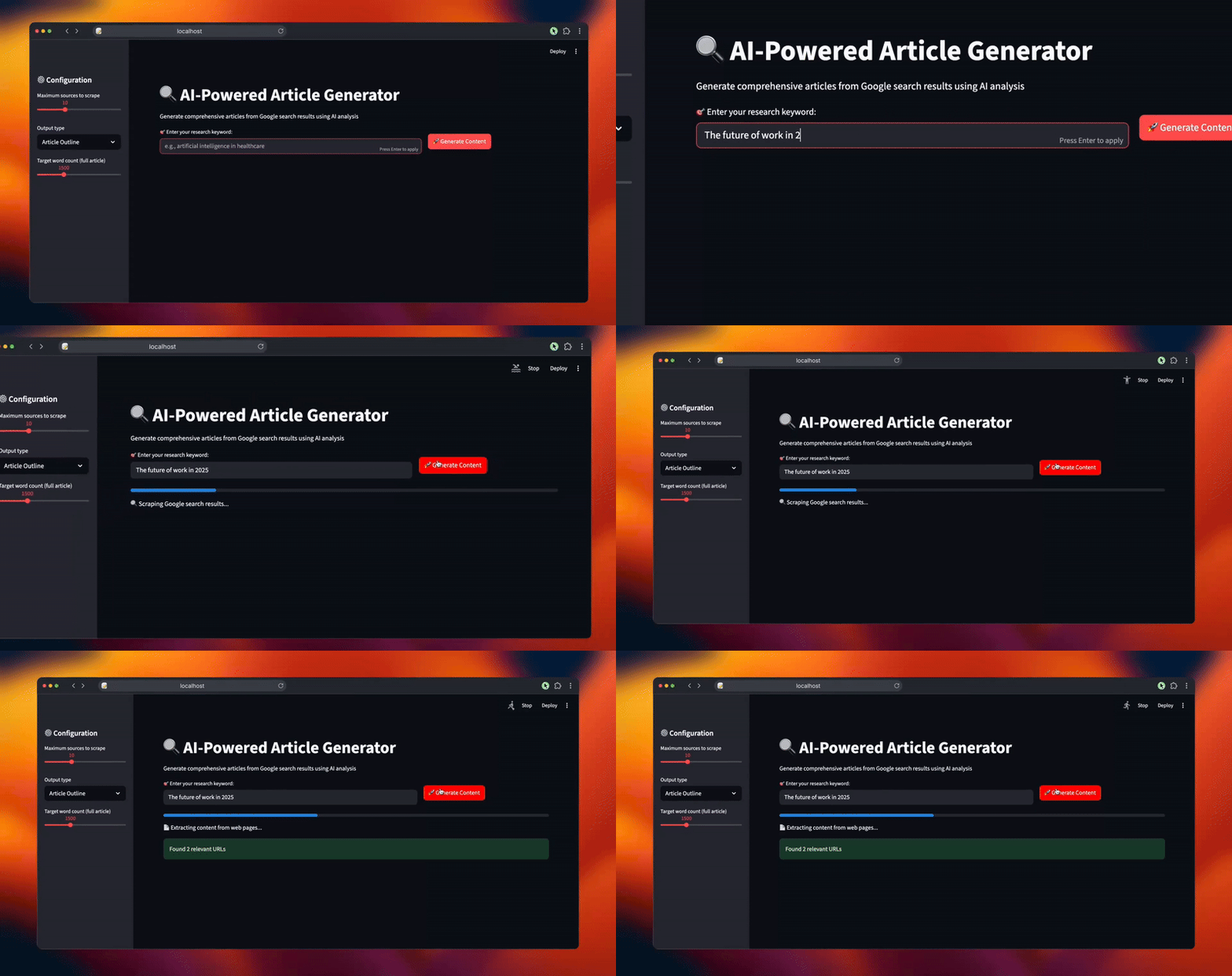
Streamlit 인터페이스는 실시간 진행 상황 추적, 사용자 정의 가능한 매개변수, 연구 분석 및 생성된 콘텐츠의 즉각적인 미리보기를 통해 직관적인 워크플로를 제공합니다. 사용자는 추가 편집이나 출판을 위해 결과를 마크다운 형식으로 다운로드할 수 있습니다.
기사 생성기 실행하기
웹 연구를 기반으로 콘텐츠 생성을 시작하려면 애플리케이션을 실행하세요. 터미널을 열고 프로젝트 디렉터리로 이동합니다.
streamlit run article_generator.py시스템이 요청을 처리하는 지능형 워크플로를 확인할 수 있습니다:
- 관련성 필터링을 통해 Google SERP에서 포괄적인 검색 결과를 추출합니다
- 봇 방지 보호 기능으로 대상 웹 페이지의 전체 콘텐츠를 스크래핑
- 벡터 임베딩 및 주제 식별을 통한 의미론적 콘텐츠 처리
- 다중 출처에서 반복되는 패턴 및 핵심 인사이트 분석
- 적절한 흐름과 전문적인 서식으로 구조화된 콘텐츠 생성
마무리
이제 여러분은 여러 출처에서 연구 데이터를 자동으로 수집하여 포괄적인 콘텐츠로 변환하는 완전한 기사 생성 시스템을 갖추게 되었습니다. 이 시스템은 의미론적 콘텐츠 분석을 수행하고, 출처 전반에 걸쳐 반복되는 주제를 식별하며, 구조화된 기사나 개요를 생성합니다.
스크래핑 대상과 분석 기준을 수정하여 다양한 산업에 이 프레임워크를 적용할 수 있습니다. 모듈식 설계로 필요에 따라 새로운 콘텐츠 플랫폼, 임베딩 모델 또는 생성 템플릿을 추가할 수 있습니다.
보다 진보된 워크플로우를 구축하려면 실시간 웹 데이터 수집, 검증 및 변환을 위한 Bright Data AI 인프라의 전체 솔루션 범위를 살펴보세요.
무료 Bright Data 계정을 생성하고 AI 활용이 가능한 웹 데이터 솔루션으로 실험을 시작하세요!