


BitBrowser Proxy Integration
Pairing Bright Data proxies with BitBrowser enhances web scraping by providing secure, anonymous browsing and reducing the risk of detection and IP bans.
This guide may be outdated. For an up-to-date guide please see our documentation.

- 400M+ Residential IPs
- Sticky and rotating sessions
- 99.95% success rate
- Geo-location targeting - FREE
What is BitBrowser?
BitBrowser emerges as a powerful tool for secure, anonymous web browsing…making it an ideal solution for web scraping, market research, and data collection tasks securely. With capabilities like simulating independent computer information, different IP addresses for each window, and preventing account association, BitBrowser ensures each account operates in a completely isolated environment. Its integration with the Google kernel allows for deep anonymization and the recommendation of clean proxy IPs, making it an ideal solution for managing social media, e-commerce, and other web-based accounts securely.
BitBrowser’s ecosystem – encompassing group control synchronization and RPA browser automation, further enhances its usability – makes it a go-to choice for professionals in data collection, competitive research and other industries requiring RPA, robust browser automation and security.
BitBrowser and Bright Data Proxies
Integrating BitBrowser with Bright Data’s diverse proxy solutions significantly enhances online account management and security. Here’s how Bright Data’s proxies complement the capabilities of BitBrowser:
- Expansive Proxy Network: Leverage Bright Data’s extensive network, featuring 400M+ monthly IP addresses from data centers, residential areas, and mobile networks around the world. This wide reach is invaluable for BitBrowser users looking to collect data across different geographies.
- Superior Security and Anonymity: Bright Data’s proxies ensure that activities conducted through BitBrowser are secure and private. This added layer of protection is crucial for users managing sensitive information across multiple accounts.
- Unrestricted Global Access: With Bright Data proxies, overcome geo-restrictions and access content from any corner of the globe. This is especially beneficial for BitBrowser users engaging in cross-border e-commerce and international marketing.
- Enhanced Browsing Speed: Experience faster and more efficient browsing. Bright Data’s advanced proxy technology ensures a smooth and speedy internet experience, complementing BitBrowser’s capabilities.
- Diverse Application: Bright Data’s proxies are versatile, catering to a range of online activities from data scraping to bypassing geographical limitations, making them a perfect match for the varied use cases of BitBrowser.
- Consistent and Reliable Connection: Minimize disruptions and maintain stable online operations with Bright Data’s robust proxy infrastructure, enhancing the reliability of BitBrowser’s tasks.
By integrating Bright Data’s proxies with BitBrowser, users gain a powerful toolset for web scraping and data collection with enhanced security, efficiency, and global access, making this combination a top choice for professionals in diverse online sectors.
How to integrate proxies with BitBrowser
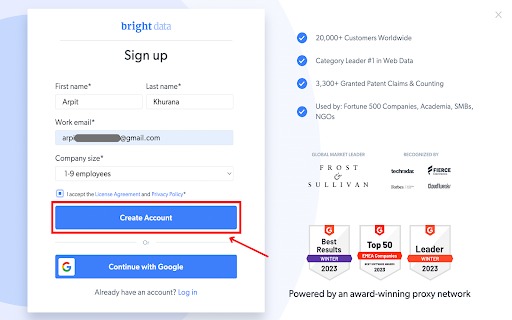
Registration on Bright Data:
Sign up on the Bright Data platform.
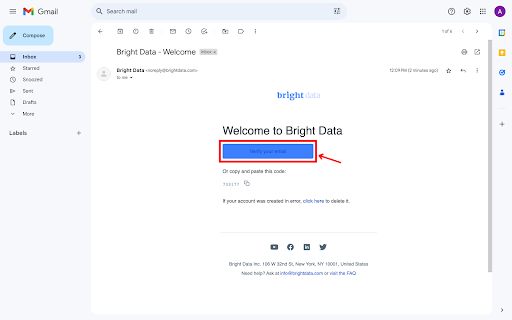
Email verification:
Verify your email address to activate your account.
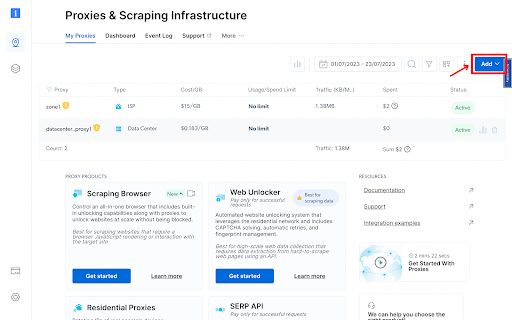
Zone Configuration:
Navigate to the “Proxy & Scraping Infrastructure” section and Add a new designated Zone for your proxy usage.
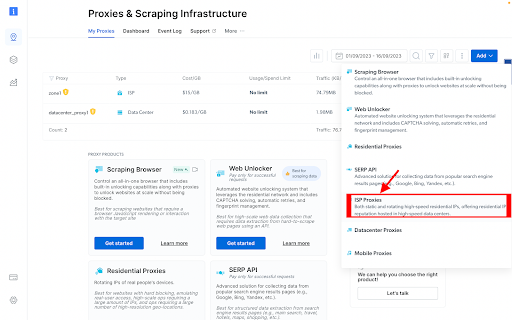
Proxy type selection:
Select the type of proxies you need. In this example, ISP will be selected.
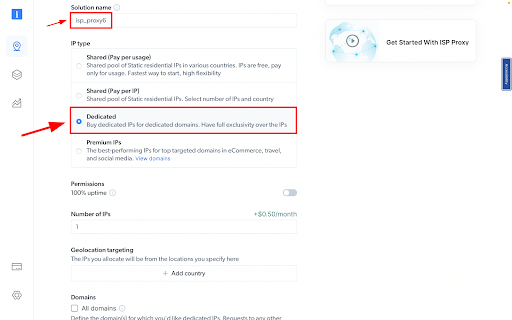
IP Type and Location Selection:
Name your solution. Set the IP type to “Dedicated”
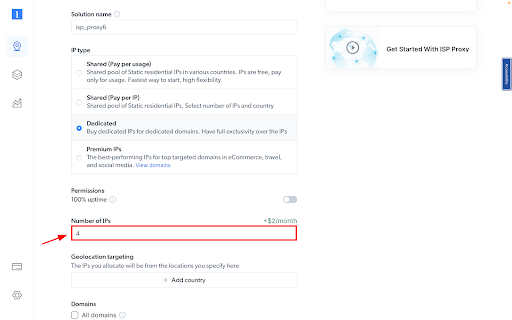
IPs amount:
Fill in the number of IPs you need.
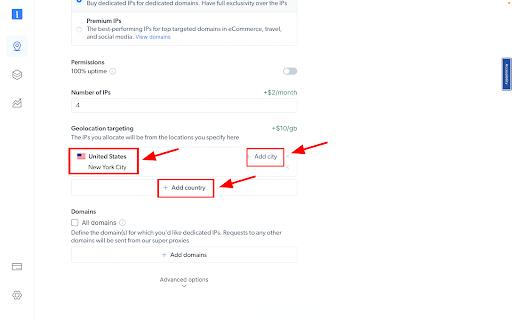
IP location:
Choose your desired country and city for the IP location.
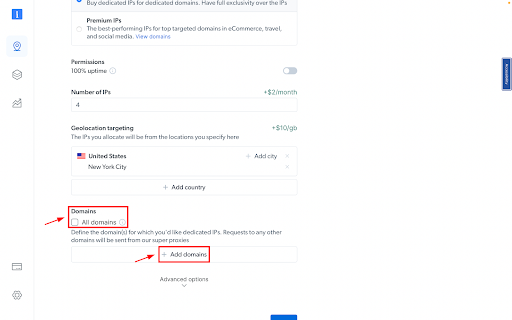
Specify domains:
Specific domains or use ‘All domains’ for one IP to target websites using the same IP.
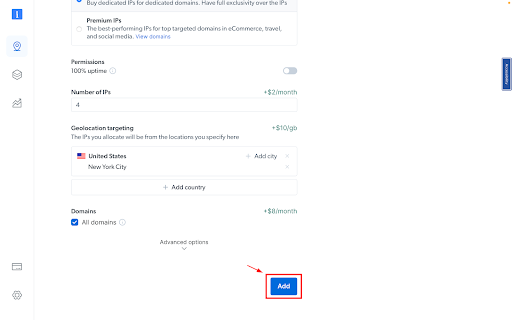
Plan Confirmation:
Review your chosen plan and its associated costs.
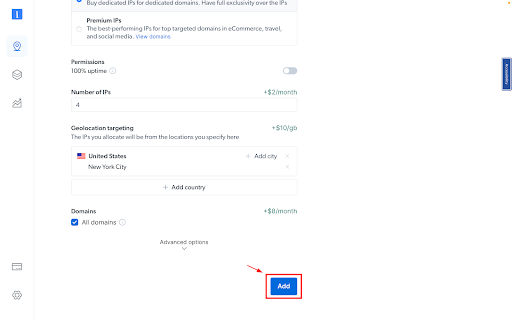
Create zone:
Click the “Add” button to create the Zone.
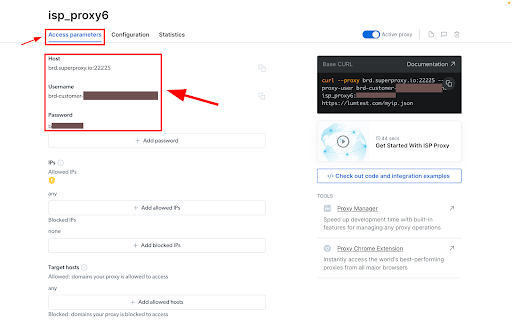
Accessing proxy details:
Click on the name of your Zone, navigate to the “Access Parameters” tab, and note down the proxy credentials:
– host
– port
– username
– password
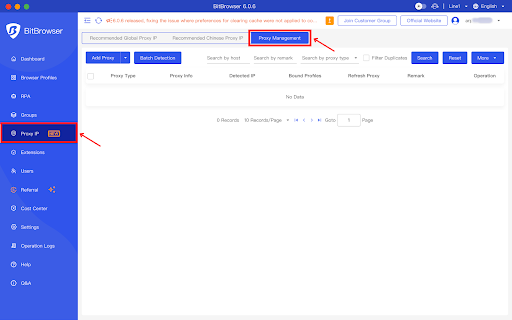
Accessing the Proxy Section in BitBrowser:
In BitBrowser, select ‘Proxy IP’ from the left navigation menu and then choose the ‘Proxy Management’ section to proceed.
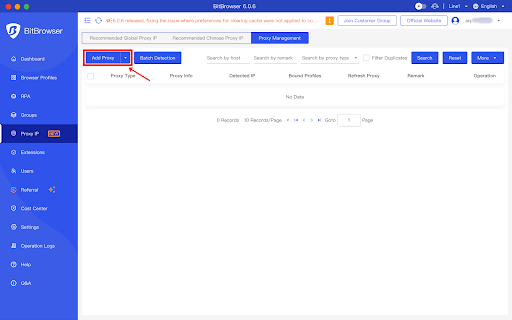
Add a New Proxy:
Click on the ‘Add Proxy’ button.
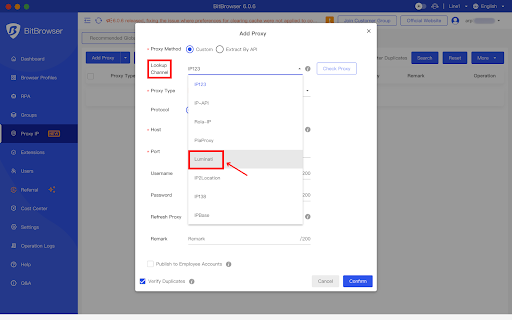
Set Lookup Channel:
From the ‘Lookup Channel’ dropdown select ‘Luminati’
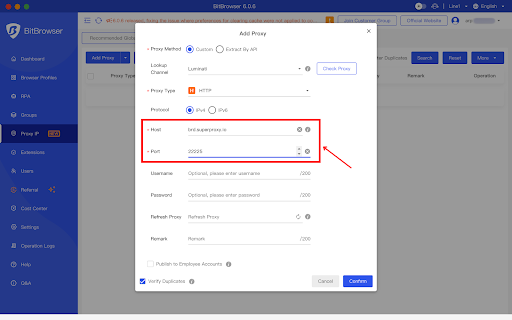
Set Proxy Details:
- From the ‘Proxy Type‘ dropdown select ‘HTTP‘
- For the host, enter brd.superproxy.io
- For the port, enter 33335 .
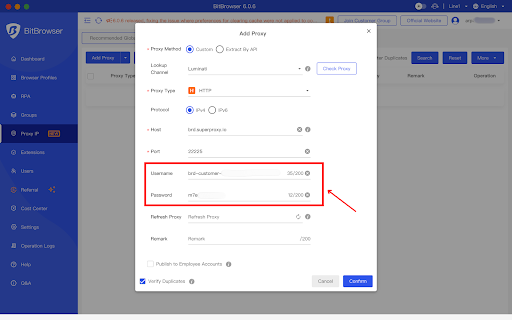
Enter Bright Data Credentials:
Retrieve credentials from your Bright Data dashboard->zone->access parameters.
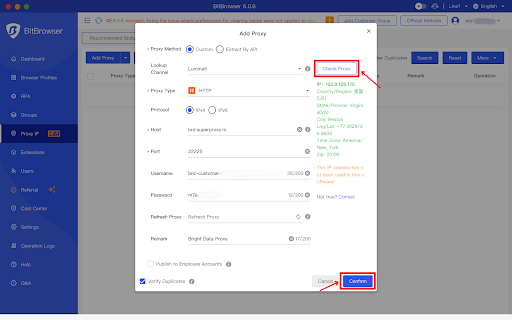
Test the Connection:
- Click on the ‘Check Proxy’ button.
- Ensure it’s successful and then confirm the settings.
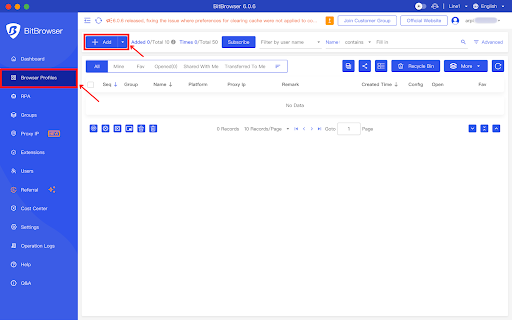
Initiate New Browser Profile:
Click on ‘Browser profiles’ and then click on the ‘ Add’ button.
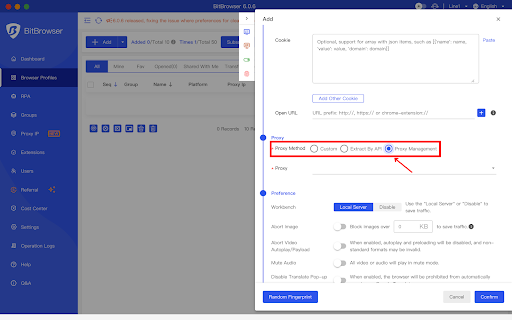
Access Proxy Configuration Section:
Scroll down to the proxy configuration section and select the ‘Proxy Management’ radio button.
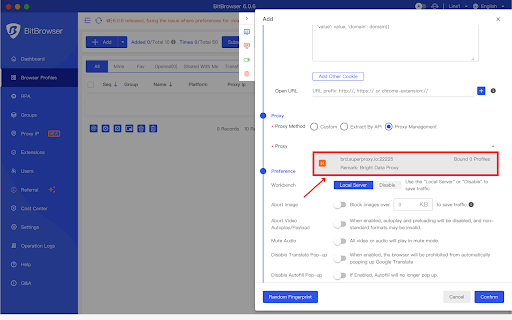
Select Bright Data Proxy for the Profile:
From the ‘Proxy’ dropdown, choose the ‘Bright Data proxy’ that was previously created.
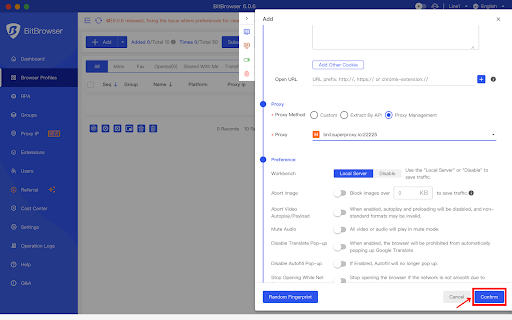
Save, Create, and Use Profile:
Configure the profiles as per your preference and then click on the ‘Confirm’ button to create the profile.
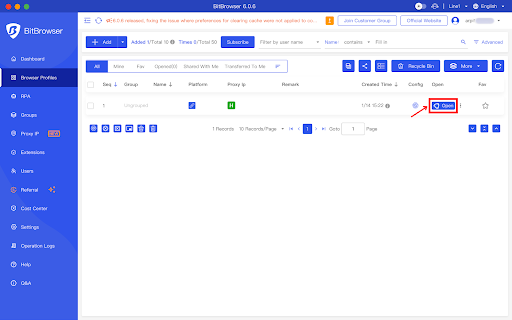
Initiating Your Session with Bright Data Proxies:
Open BitBrowser. Voilà! You are now ready to navigate online using BitBrowser with Bright Data proxies.
⚠️Important note: If you are using Bright Data’s Residential Proxies, Web Unlocker or SERP API, you need to install an SSL certificate to enable end-to-end secure connections to your target website(s). This is a simple process, see https://docs.brightdata.com/general/account/ssl-certificate#installation-of-the-ssl-certificate for instructions.
Get proxies for BitBrowser
수상 경력에 빛나는 프록시 인프라로 구동됩니다
400 million개 이상의 주거용 IP, 최고 수준의 기술력, 그리고 국가, 도시, 우편번호, 통신사, ASN을 대상으로 할 수 있는 능력은 저희 프리미엄 프록시 서비스를 개발자들에게 최고의 선택이 되게 합니다.


모든 개발 경로를 위한 프록시
네트워크, 피어, IP를 자유롭게 조합하여 지속적인 웹 데이터 흐름을 최적화하세요.


Proxy Network Pricing


- 무제한 확장성
- 무제한 좌석
- 프리미엄 SLA
- 99.99% 네트워크 가동 시간
- 무료 프록시 관리자
- 완전한 데이터 커버리지
- GB당 맞춤형 가격
- 맞춤형 솔루션
- 무제한 확장성
- 무제한 좌석
- 프리미엄 SLA
- 99.99% 네트워크 가동 시간
- 무료 프록시 관리자
- 완전한 데이터 커버리지
- GB당 맞춤형 가격
- 맞춤형 솔루션
- 무제한 확장성
- 무제한 좌석
- 프리미엄 SLA
- 99.99% 네트워크 가동 시간
- 무료 프록시 관리자
- 완전한 데이터 커버리지
- GB당 맞춤형 가격
- 맞춤형 솔루션

업계 최고의 고객 경험
매일 새로운 기능이 출시됩니다
필요할 때 바로 질문에 답변하기 위해
실시간 네트워크 성능 대시보드
성능 최적화를 위해
데이터 수집 목표를 달성하기 위해
프록시 및 데이터 수집 분야의 선도 기업

650 매일 수집되는 공개 데이터 TB

매일 새로운 기능이 출시됩니다

세계 최고의 대학 7/10개 제공
