


Firefox proxy integration
Integrating Firefox with Bright Data proxies enables secure and anonymous browsing, offering flexible proxy management for efficient web scraping and data gathering.
This guide may be outdated. For an up-to-date guide please see our documentation.

- 400M+ Residential IPs
- Sticky and rotating sessions
- 99.95% success rate
- Geo-location targeting - FREE
Firefox proxy integration
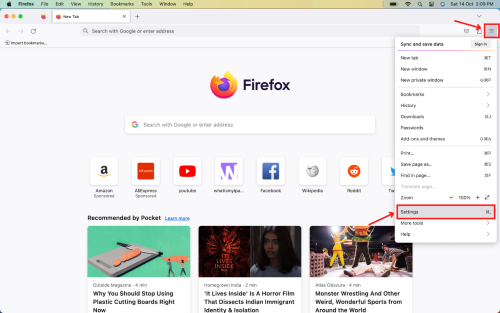
Navigate to Firefox settings:
Click on the three vertical dots in the upper right corner to access the menu, then select “Settings”.
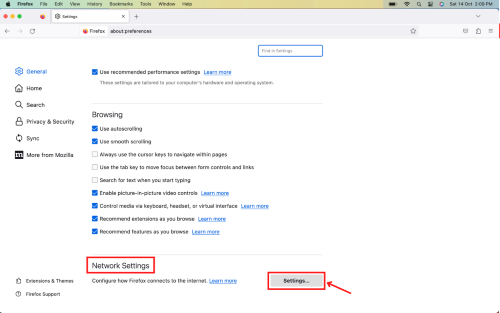
Access Network Settings:
Scroll down to locate “Network Settings”, and click on the “Settings” button adjacent to it.
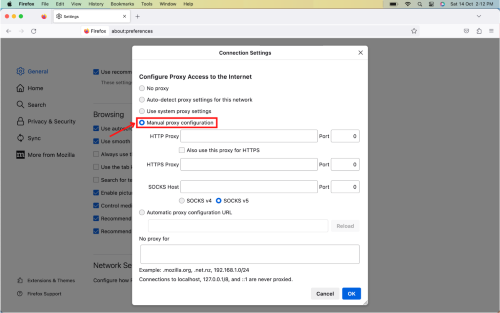
Configure Manual Proxy:
Choose “Manual proxy configuration” from the available options.
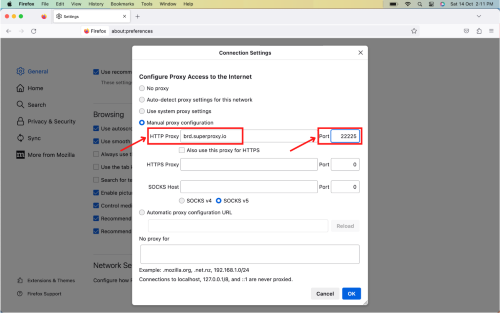
Input Proxy Details:
In the “HTTP Proxy” field, enter Bright Data’s host: brd.superproxy.io
For “Port“, input 33335.
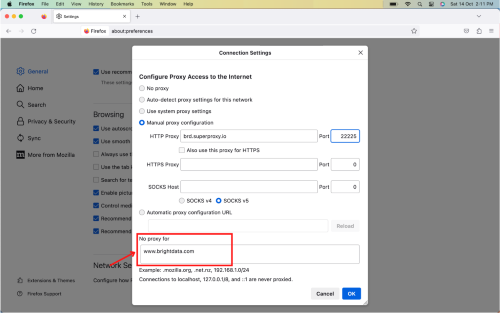
Manage Non-Proxy Visits:
In the “No Proxy for” section, specify any websites or addresses you wish to access without utilizing the proxy. Once done, click “OK” to apply and save configurations.
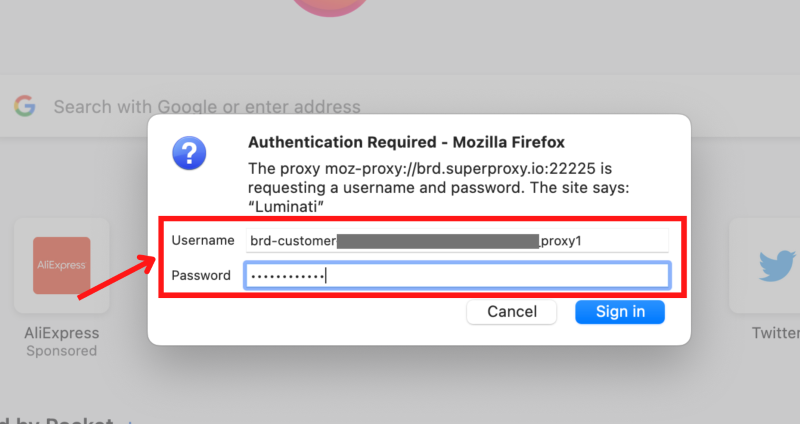
Authenticate your account:
Upon visiting a website, a pop-up window will request your account credentials. Enter your “Username” and “Password” in the respective fields. Once done, just sign in & get started.
Bravo! You’ve successfully configured Bright Data proxies on your Mozilla Firefox browser.
⚠️Important note: If you are using Bright Data’s Residential Proxies, Web Unlocker or SERP API, you need to install an SSL certificate to enable end-to-end secure connections to your target website(s). This is a simple process, see https://docs.brightdata.com/general/account/ssl-certificate#installation-of-the-ssl-certificate for instructions.
Get proxies for Firefox
수상 경력에 빛나는 프록시 인프라로 구동됩니다
400 million개 이상의 주거용 IP, 최고 수준의 기술력, 그리고 국가, 도시, 우편번호, 통신사, ASN을 대상으로 할 수 있는 능력은 저희 프리미엄 프록시 서비스를 개발자들에게 최고의 선택이 되게 합니다.
모든 개발 경로를 위한 프록시
네트워크, 피어, IP를 자유롭게 조합하여 지속적인 웹 데이터 흐름을 최적화하세요.


Proxy Network Pricing


- 무제한 확장성
- 무제한 좌석
- 프리미엄 SLA
- 99.99% 네트워크 가동 시간
- 무료 프록시 관리자
- 완전한 데이터 커버리지
- GB당 맞춤형 가격
- 맞춤형 솔루션
- 무제한 확장성
- 무제한 좌석
- 프리미엄 SLA
- 99.99% 네트워크 가동 시간
- 무료 프록시 관리자
- 완전한 데이터 커버리지
- GB당 맞춤형 가격
- 맞춤형 솔루션
- 무제한 확장성
- 무제한 좌석
- 프리미엄 SLA
- 99.99% 네트워크 가동 시간
- 무료 프록시 관리자
- 완전한 데이터 커버리지
- GB당 맞춤형 가격
- 맞춤형 솔루션
- 무제한 확장성
- 무제한 좌석
- 프리미엄 SLA
- 99.99% 네트워크 가동 시간
- 무료 프록시 관리자
- 완전한 데이터 커버리지
- GB당 맞춤형 가격
- 맞춤형 솔루션

프록시 및 데이터 수집 분야의 선도 기업

650 매일 수집되는 공개 데이터 TB

매일 새로운 기능이 출시됩니다

세계 최고의 대학 7/10개 제공
