


Octo Browser Proxy Integration
Integrating OctoBrowser with Bright Data proxies enhances web scraping by providing advanced anti-detection features and streamlined proxy management for secure and efficient browsing.
This guide may be outdated. For an up-to-date guide please see our documentation.

- 400M+ Residential IPs
- Sticky and rotating sessions
- 99.95% success rate
- Geo-location targeting - FREE
What is Octo Browser?
Octo Browser is a cutting-edge antidetect browser designed for effortless multi-accounting. With Octo Browser, you can create and manage any number of accounts without the worries of IP bans or additional costs. It’s an essential tool for digital marketers, e-commerce professionals, and anyone needing to maintain multiple online identities.
Key Features of Octo Browser
Octo Browser excels with its unique fingerprint management and anti-detection abilities, enabling reliable access to websites for web scraping and data collection. Compatible with Windows, Intel/Apple Silicon MacOS, and LinuxBeta, it confidently passes tests from checkers like Pixelscan and BrowserLeaks. With robust support options, including TeamViewer sessions, and an emphasis on user privacy, it’s designed for discreet and efficient web navigation.
SPECIAL OFFER: First 100 users to use promocode BRIGHTDATA30 will receive 4 days of STARTER subscription for free!
How to integrate Octo Browser with Bright Data proxies
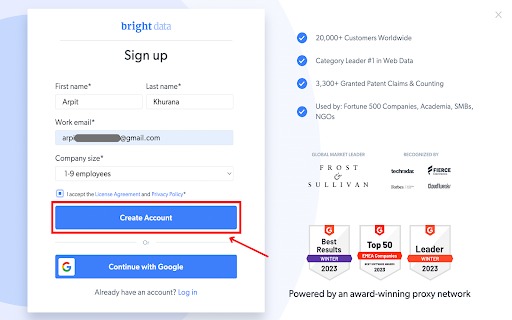
Registration on Bright Data:
Sign up on the Bright Data platform.
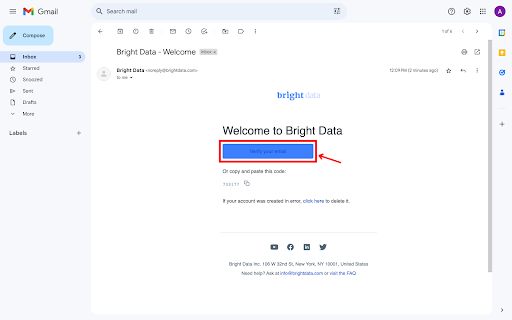
Email verification:
Verify your email address to activate your account.
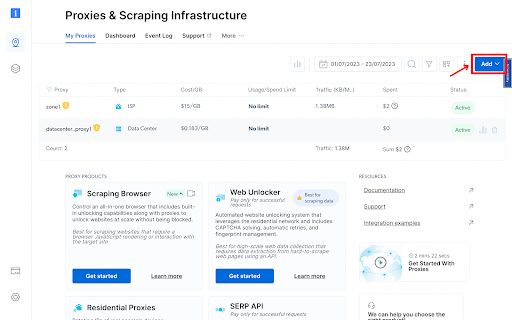
Zone Configuration:
Navigate to the “Proxy & Scraping Infrastructure” section and Add a new designated Zone for your proxy usage.
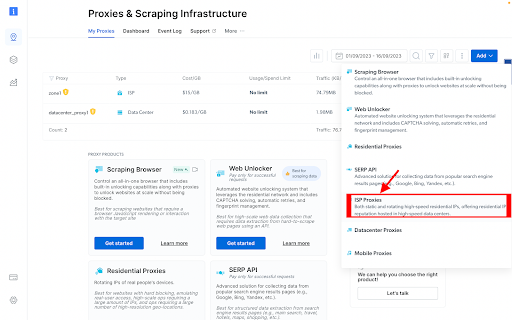
Proxy type selection:
Select the type of proxies you need. In this example, ISP will be selected.
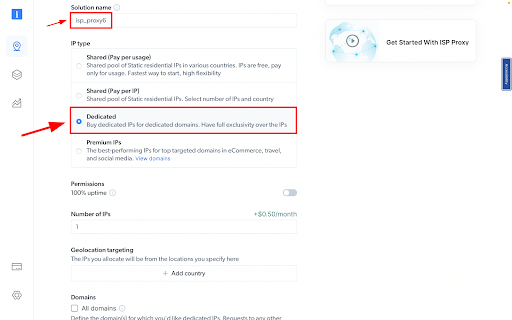
IP Type and Location Selection:
Name your solution. Set the IP type to “Dedicated”
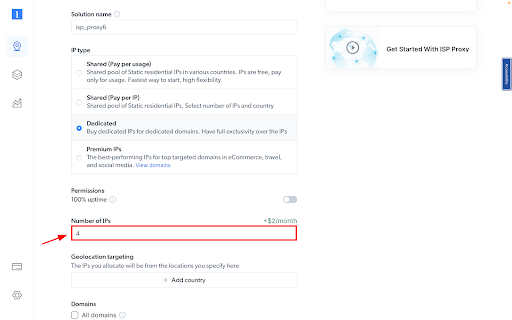
IPs amount:
Fill in the number of IPs you need.
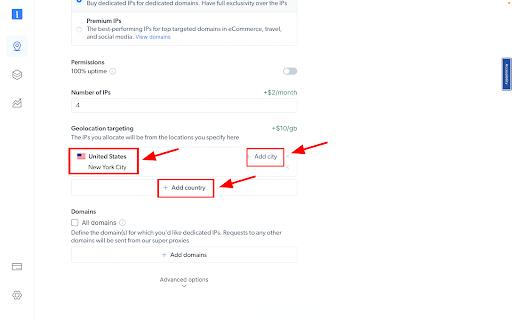
IP location:
Choose your desired country and city for the IP location.
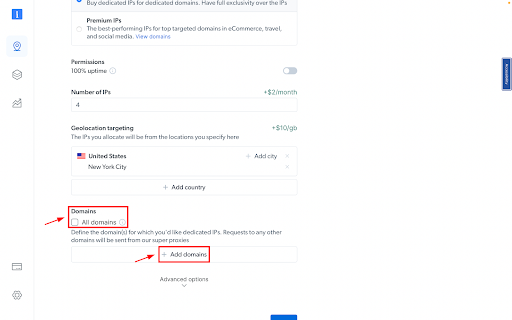
Specify domains:
Specific domains or use ‘All domains’ for one IP to target websites using the same IP.
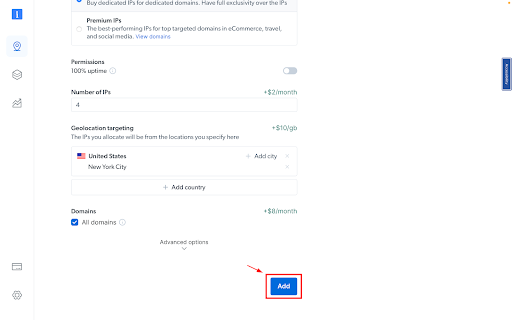
Plan Confirmation:
Review your chosen plan and its associated costs.
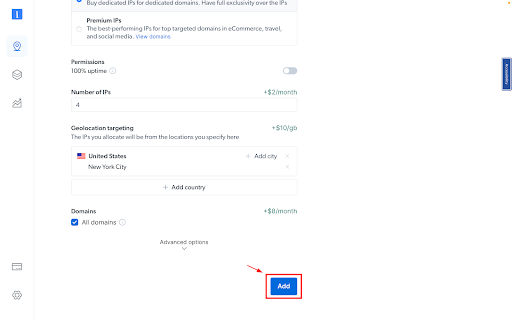
Create zone:
Click the “Add” button to create the Zone.
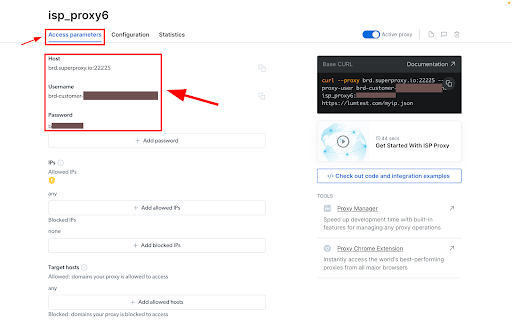
Accessing proxy details:
Click on the name of your Zone, navigate to the “Access Parameters” tab, and note down the proxy credentials:
– host
– port
– username
– password
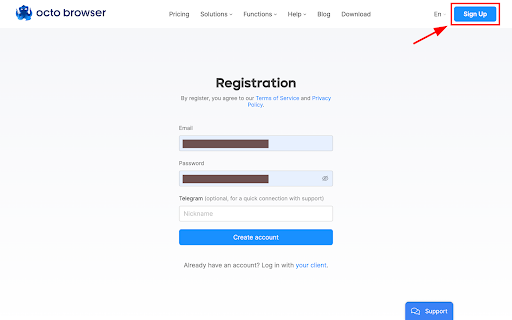
Octo Browser Installation:
Sign up for a free Octo Browser account.
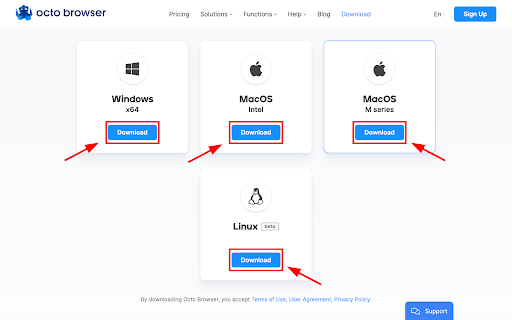
Download Octo Browser:
Download Octo Browser as per your OS.
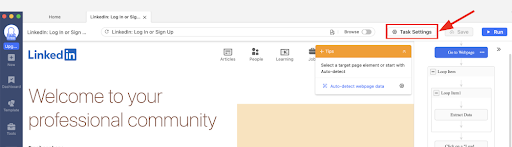
Open task for setup:
Open the task you would like to set up proxies for and go to the task settings.
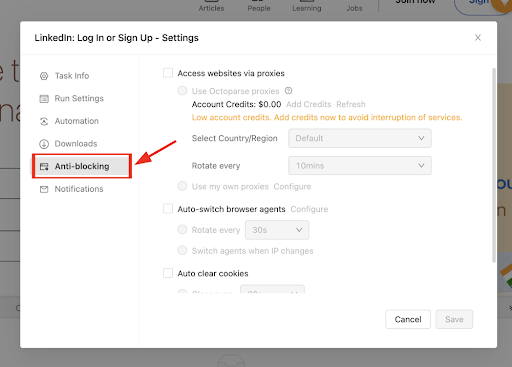
Anti-blocking section:
Go to the Anti-blocking section.
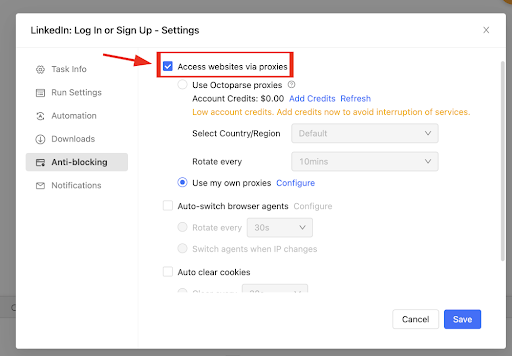
Check Access websites via proxies.
Now, choose the ‘Access websites via proxies’ option.
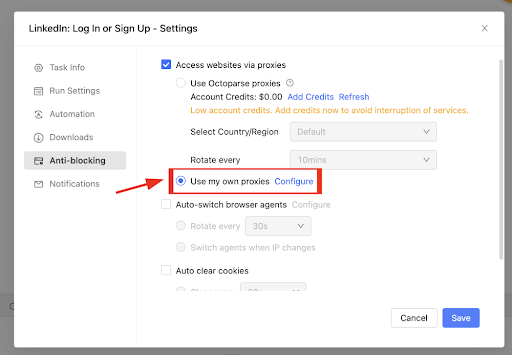
Select Use my own proxies:
Select Use my own proxies and click configure.
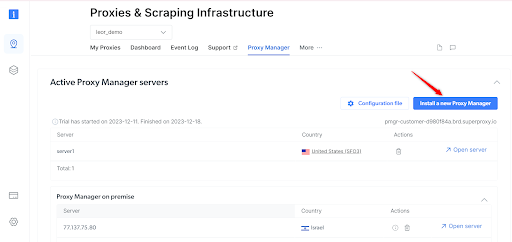
Proxy and infrastructure:
Head back over to the “Proxies and Scraping Infrastructure” section, select the “Proxy Manager” tab and click on “Install a new Proxy Manager,” and then scroll to the installation section.
From here, download the Windows installer, and once the downloading is complete, run the program and wait for the installation to be complete.
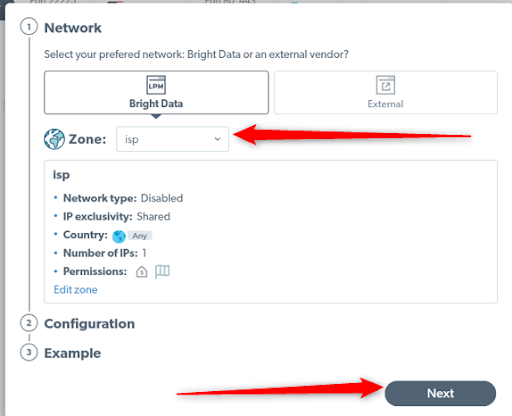
Proxy manager dashboard:
Open the Proxy Manager Dashboard and click on Start. Here you can see the preferred networks, which will be by default Bright Data and the zones dropdown menu. Select IPS Proxy 1 and hit next.
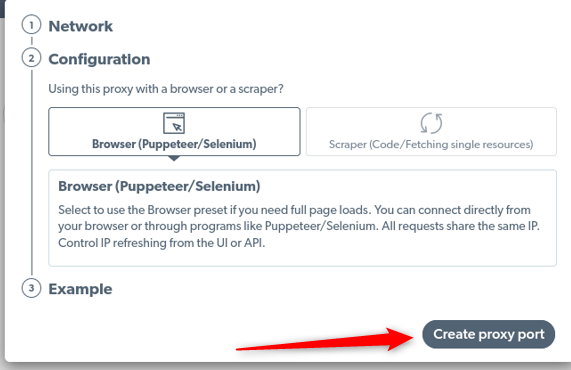
Configuration:
Keep the default Browser Proxy configuration and click on the Create proxy port. And there you have it, you can now start using the port by running the command you see in the example section.
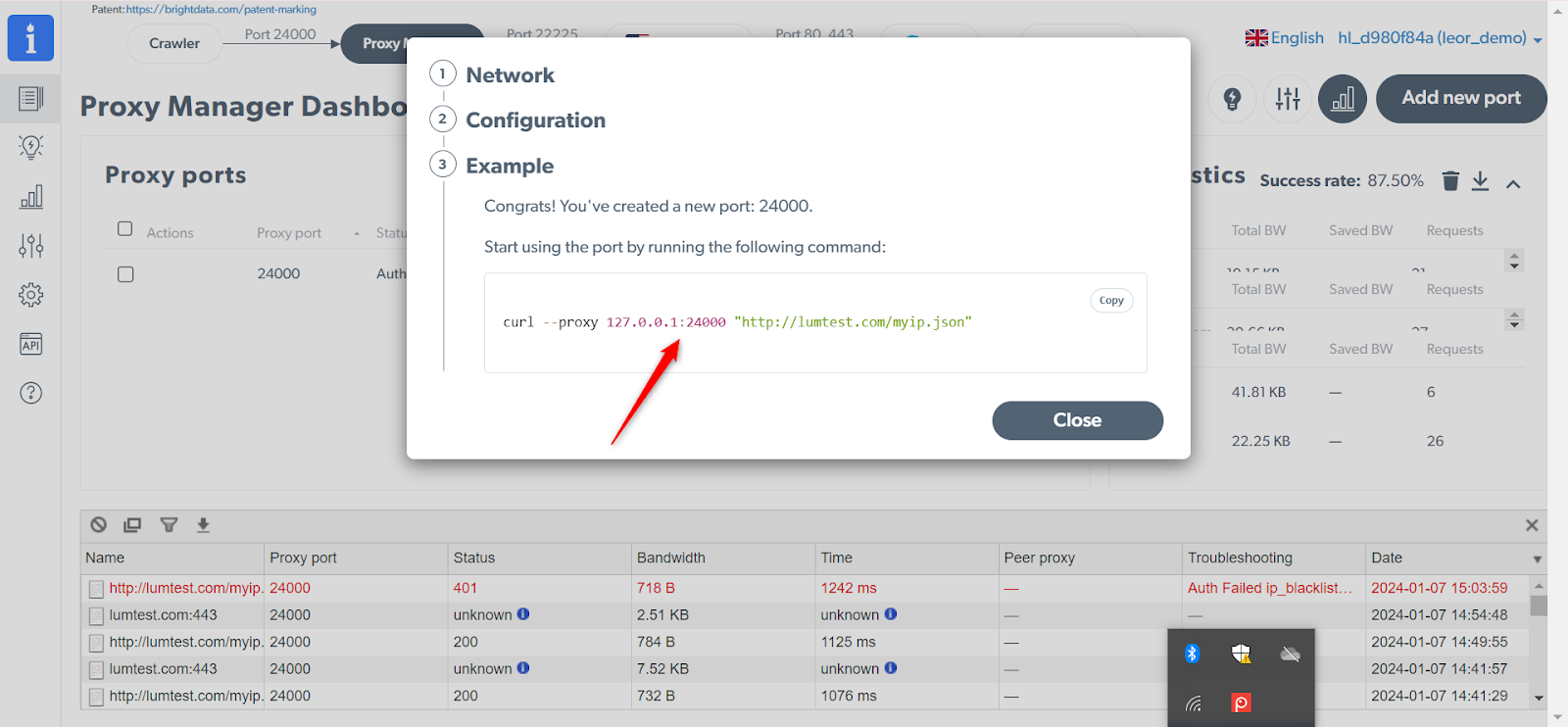
Add IP address:
Make sure you copy and save your IP address, as you will use this later for anti-blocking.
Now that the proxy port has been created, head back to Octoparse. From the menu on the left side, click on New and create a custom task. In the custom task section you can now enter your URL source manually v We will add the URL manually, as we are just testing this functionality.
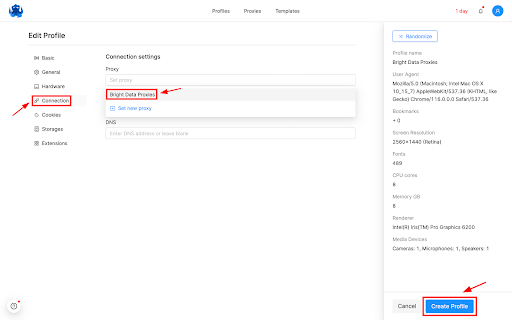
Paste the IP and Port in Octoparse:
Head back to your Octoparse Proxy settings and use the IP and Port from the proxy manager that you have setup, click on confirm and then save.
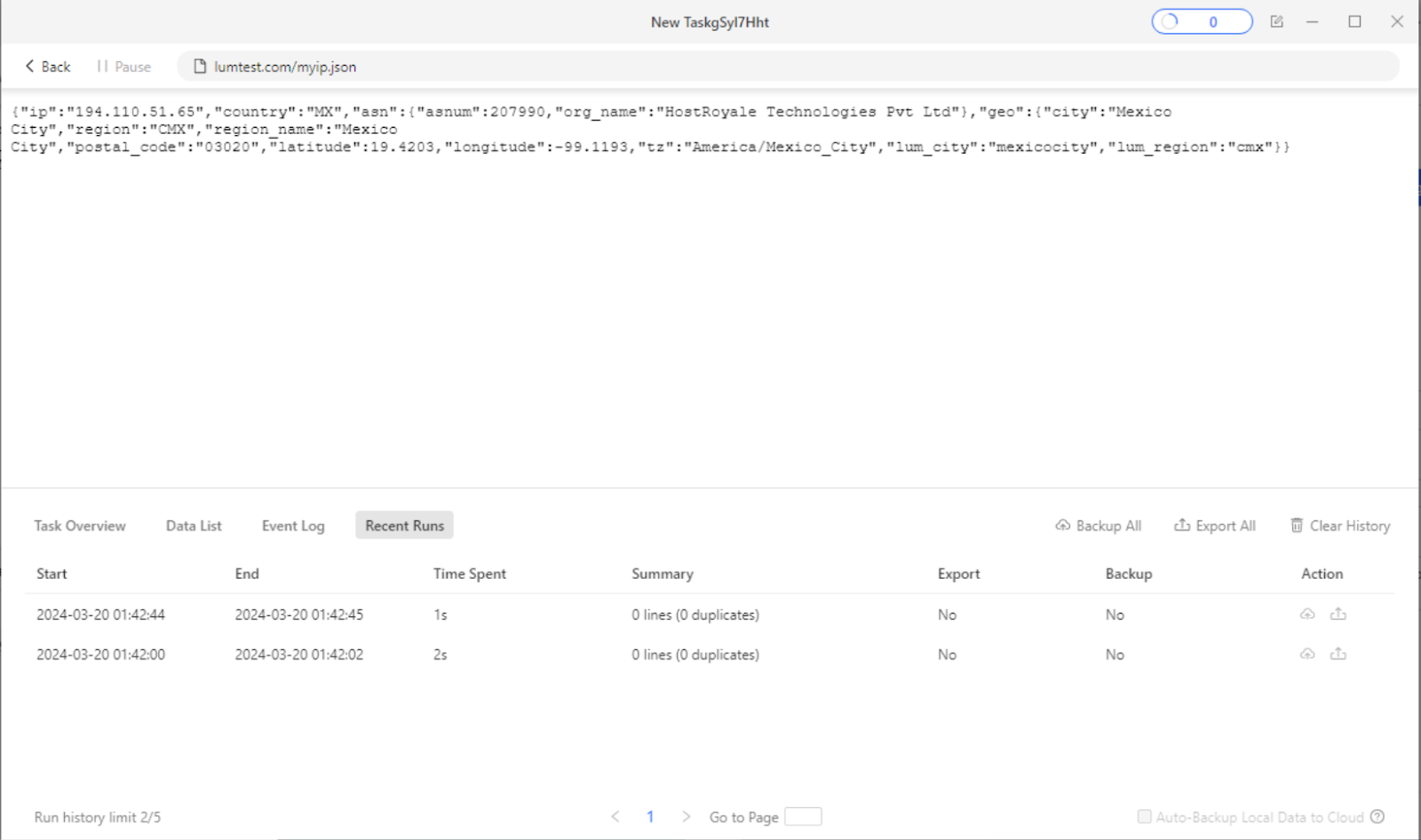
Verify proxy usage:
To confirm the use of your Bright Data proxy You can run a task using this URL : lumtest.com/myip.json
Open the browser and confirm the IP you are getting is correlated with your proxy configuration.
Setting up Octo Browser with Bright Data proxies:
⚠️Important note: If you are using Bright Data’s Residential Proxies, Web Unlocker or SERP API, you need to install an SSL certificate to enable end-to-end secure connections to your target website(s). This is a simple process, see https://docs.brightdata.com/general/account/ssl-certificate#installation-of-the-ssl-certificate for instructions.
Get proxies for Octo Browser
수상 경력에 빛나는 프록시 인프라로 구동됩니다
400 million개 이상의 주거용 IP, 최고 수준의 기술력, 그리고 국가, 도시, 우편번호, 통신사, ASN을 대상으로 할 수 있는 능력은 저희 프리미엄 프록시 서비스를 개발자들에게 최고의 선택이 되게 합니다.


About Bright Data proxies

Residential Proxies
- 400,000,000+ IPs
- Available in 195 countries
- The largest rotating real-peer IP network
- Access & crawl all sophisticated websites

Datacenter Proxies
- 1,300,000+ IPs
- Available in 98 countries
- Shared and dedicated IP pools available
- Access & crawl all sophisticated websites

ISP Proxies
- 1,300,000+ IPs
- Available in 35 countries
- Real static residential IPs without IP rotation
- Best for logging into multiple accounts

Mobile Proxies
- 7,000,000+ IPs
- Available in 195 countries
- Largest real-peer 3G/4G IP network in the world
- Verify mobile ads & crawl mobile sites
Proxy Network Pricing


- 무제한 확장성
- 무제한 좌석
- 프리미엄 SLA
- 99.99% 네트워크 가동 시간
- 무료 프록시 관리자
- 완전한 데이터 커버리지
- GB당 맞춤형 가격
- 맞춤형 솔루션
- 무제한 확장성
- 무제한 좌석
- 프리미엄 SLA
- 99.99% 네트워크 가동 시간
- 무료 프록시 관리자
- 완전한 데이터 커버리지
- GB당 맞춤형 가격
- 맞춤형 솔루션
- 무제한 확장성
- 무제한 좌석
- 프리미엄 SLA
- 99.99% 네트워크 가동 시간
- 무료 프록시 관리자
- 완전한 데이터 커버리지
- GB당 맞춤형 가격
- 맞춤형 솔루션

프록시 및 데이터 수집 분야의 선도 기업

650 매일 수집되는 공개 데이터 TB

매일 새로운 기능이 출시됩니다

세계 최고의 대학 7/10개 제공

업계 최고의 고객 경험
매일 새로운 기능이 출시됩니다
필요할 때 바로 질문에 답변하기 위해
실시간 네트워크 성능 대시보드
성능 최적화를 위해
데이터 수집 목표를 달성하기 위해