


ParseHub Proxy Integration
Integrating Bright Data proxies with ParseHub enhances your web scraping by providing secure, anonymous access and reducing the risk of detection and IP bans.
This guide may be outdated. For an up-to-date guide please see our documentation.

- 400M+ Residential IPs
- Sticky and rotating sessions
- 99.95% success rate
- Geo-location targeting - FREE
What is ParseHub?
ParseHub stands out as a user-friendly, powerful web scraping tool that revolutionizes data extraction from the web. Its intuitive design allows users to effortlessly interact with complex sites, manage AJAX and JavaScript elements, and navigate through forms and infinite scrolls, all without writing a single line of code. By integrating Bright Data proxies with ParseHub, users gain an unmatched advantage, seamlessly handling even the most challenging data extraction tasks with ease. This combination ensures not only efficient data scraping but also a high level of privacy and security, making it an ideal solution for professionals seeking comprehensive data collection capabilities.
Bright Data Proxies: Empowering Your ParseHub Experience
Integrating Bright Data proxies with ParseHub transforms your web scraping capabilities, bringing a new level of efficiency and reliability to your data extraction tasks. Here’s why Bright Data’s proxy solutions are an ideal match for ParseHub’s powerful scraping features:
Extensive Proxy Network
- Global Reach: Access 400M+ monthly IPs across various locations, ensuring you can scrape data from any geographic region.
- Diverse Proxy Types: Choose from residential, datacenter, static residential, and mobile proxies to fit the specific needs of your scraping projects.
Enhanced Anonymity and Security
- Robust Privacy: Protect your scraping activities from detection and blocking, maintaining the anonymity of your operations.
- Secure Data Collection: Confidently scrape sensitive data with the assurance of Bright Data’s advanced security measures.
High Performance and Reliability
- Speed and Efficiency: Experience fast and efficient data extraction, even from complex, JavaScript-heavy websites.
- Reliable Connectivity: Minimize disruptions and maintain consistent performance with Bright Data’s stable proxy infrastructure.
Versatile and Scalable Solutions
- Adaptable to Various Use Cases: Whether for market research, web scraping, SEO analysis, or competitive intelligence, Bright Data’s proxies are versatile enough to handle diverse scraping scenarios.
- Scalability: Effortlessly scale your scraping operations to handle large volumes of data without compromising on speed or accuracy.
User-Friendly Integration
- Simple Setup: Easily integrate Bright Data proxies with ParseHub, regardless of your technical expertise.
- Comprehensive Support: Benefit from Bright Data’s extensive documentation and customer support for a smooth integration process.
How to integrate ParseHub proxies:
Sign up to Bright Data:
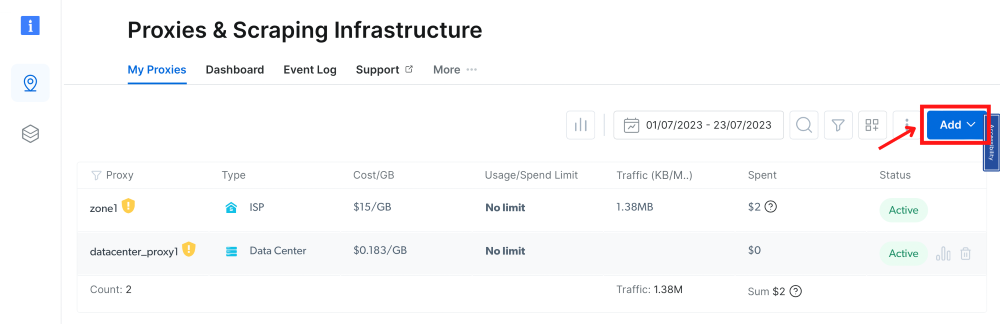
After signing up, in the Bright Data dashboard, navigate to the “Proxy & Scraping Infrastructure” section and Add a new designated Zone for your proxy usage.
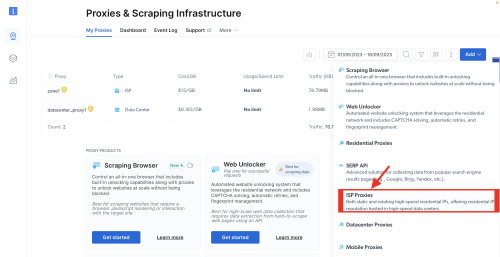
Select proxy type:
In this example, we will show how to set up ISP proxies.
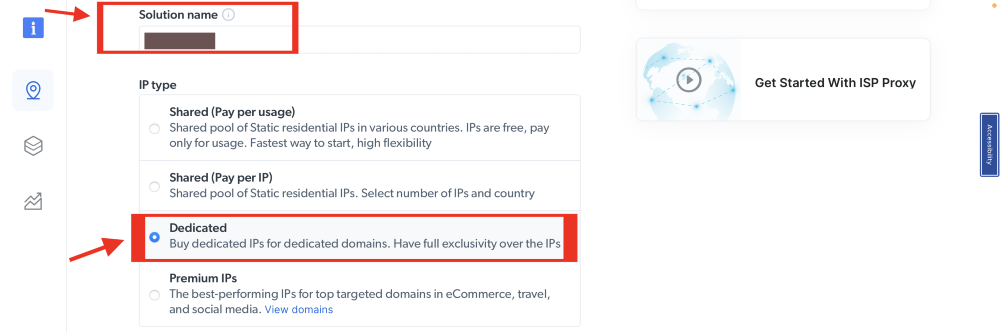
Name proxy solution:
Set the desired IP type, shared IPs, dedicated IPs, or premium IPs.

Select IP count:
Fill in the number of IPs you need.

Country & city selection:
Choose your desired country and city for the IP location.

Choose domain:
Use specific domains or use ‘All domains’ for one IP to target websites using the same IP.
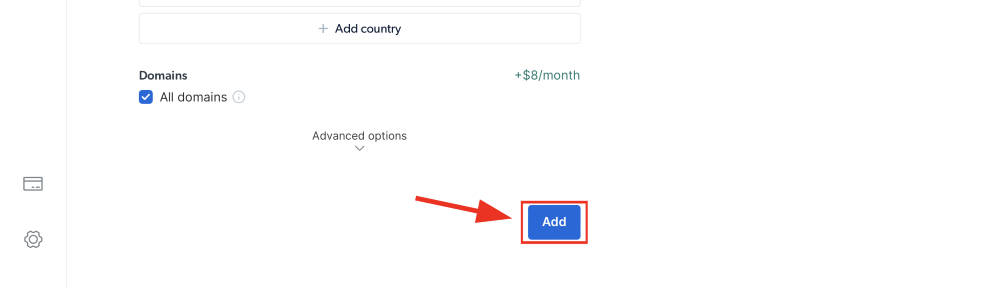
Add zone:
Click the “Add” button to create the Zone.
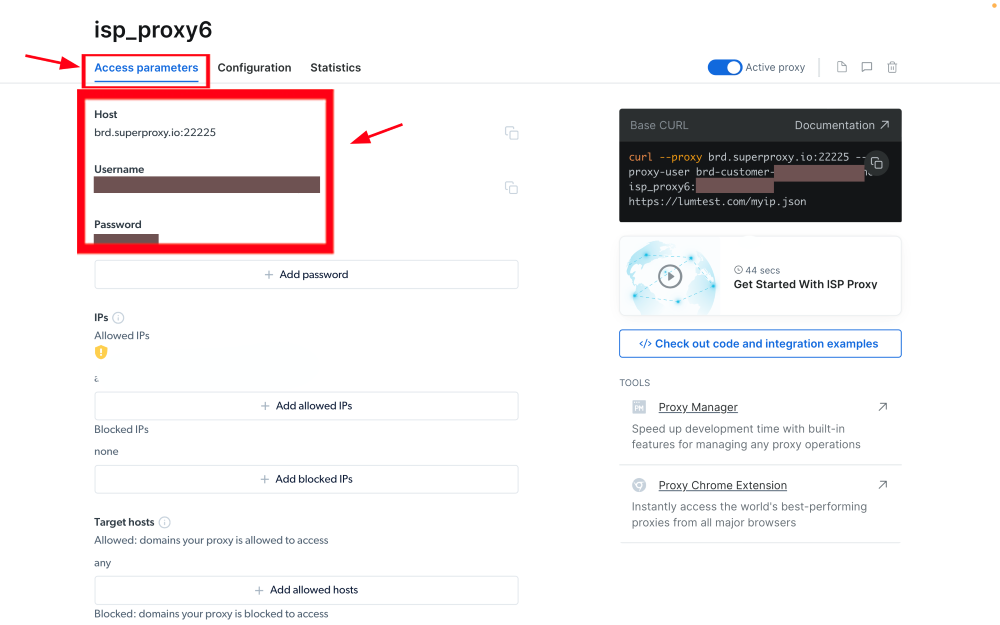
Access parameters:
Click on the name of your Zone, navigate to the “Access Parameters” tab, and note down the proxy credentials:
- host
- port
- username
- password
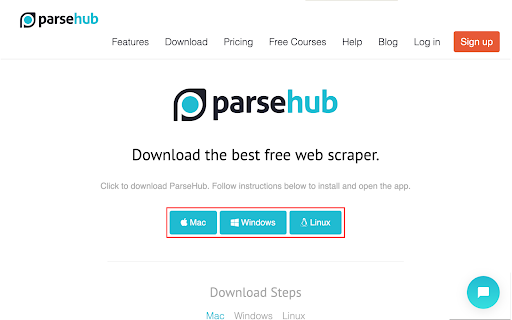
Download and Install ParseHub:
- Visit the official website of ParseHub, download, and install the ParseHub application suitable for your operating system.
- Launch ParseHub and either create a new account or log into your existing account.
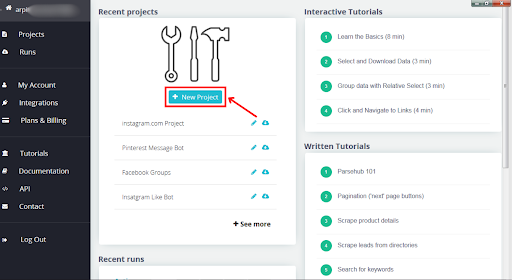
Create a New Project:
Click on the “+ New Project” button from the ParseHub home screen.
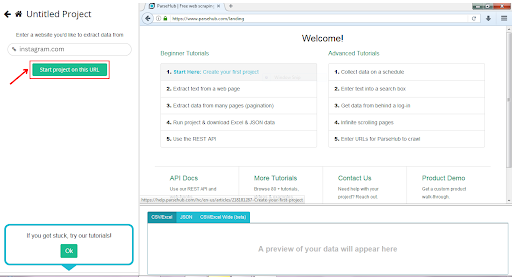
Start a New Project with a URL:
Insert a URL from which you wish to scrape data (for example, instagram.com) and press “Start project on this URL”.
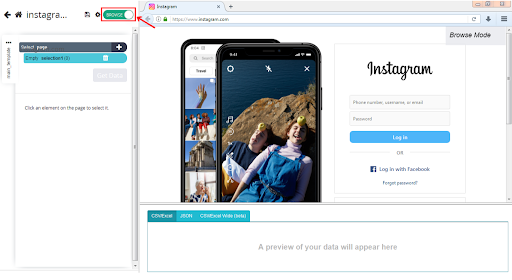
Navigate to Proxy Configuration in ParseHub:
Switch to the Browser mode, slider turns green to indicate browsing mode.
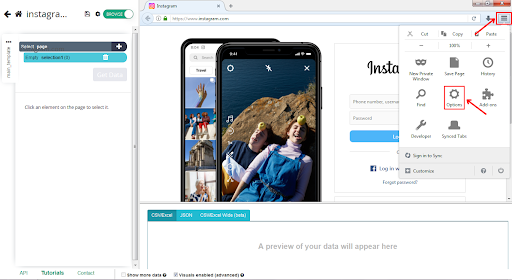
Settings:
Open the settings located at the top-right side of the Browser interface and click on “options”.
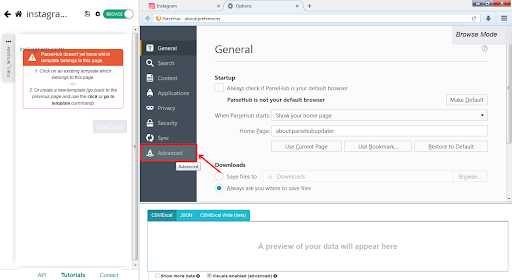
Access Advanced Network Settings:
Select the “Advanced” tab.
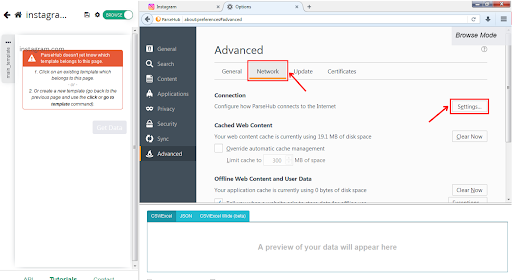
Click on the “Network” tab:
Under “Connection” choose “Settings”.
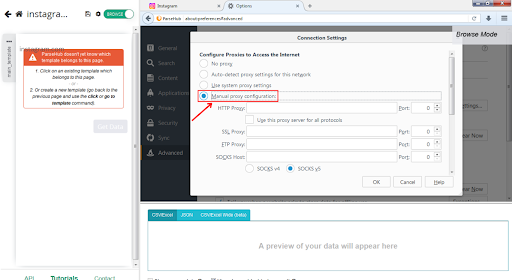
Configure Manual Proxy Settings:
In the network settings, select “Manual proxy configuration”.
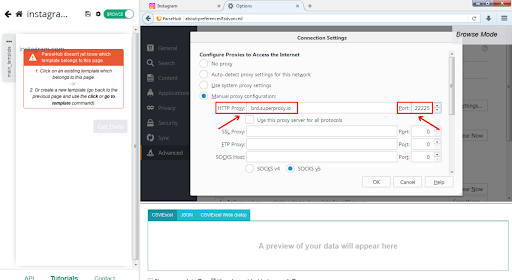
Proxy settings:
Under HTTP Proxy field enter the Bright Data proxy URL brd.superproxy.io and port as 33335.
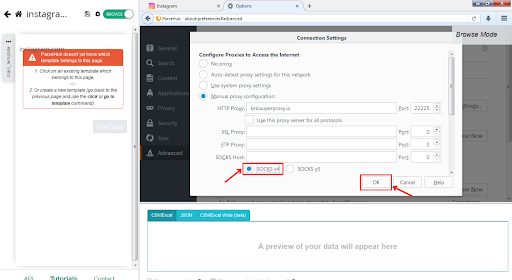
Switch to SOCKS v4 and click ok
After you switched to the SOCKS v4, click the ‘OK’ button.
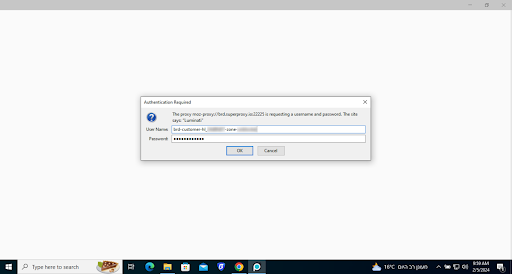
Proxy zone credentials:
Insert your proxy zone’s credentials , they can be found on your proxy zone’s access parameters.
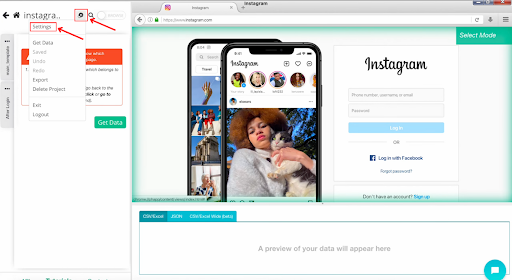
Format Proxy Configuration:
- Format your proxy details as IPAddress:Port:Username:Password:Realm.
- In case of Bright Data Proxies it will be: brd.superproxy.io:33335:brd-customer-hl_******-zone-isp_proxy6:b1s*****:Luminati
Apply Configured Proxy to ParseHub Project:
- Navigate to your project settings in ParseHub.
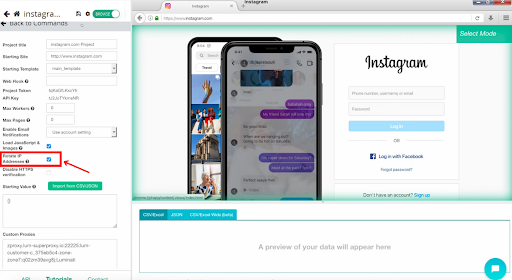
Enable Custom Proxies:
Check “Rotate IP Addresses” to enable the “Custom Proxy” text box.
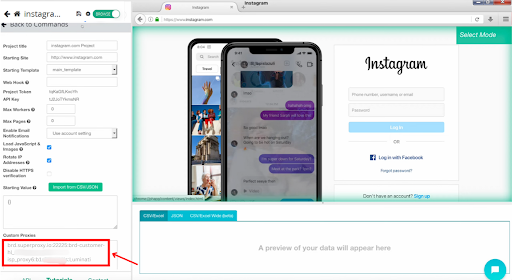
Custom proxies field:
Paste your formatted proxy into the “Custom Proxies” field. For multiple proxies, list each one on a separate line.
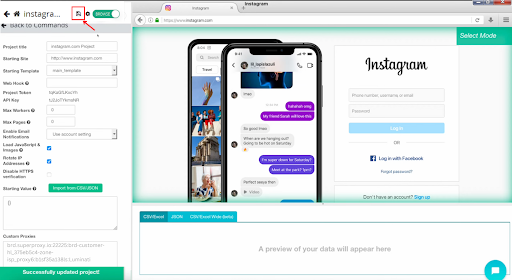
Save your project settings:
After saving, run it with your Bright Data Proxies.
⚠️Important note: If you are using Bright Data’s Residential Proxies, Web Unlocker or SERP API, you need to install an SSL certificate to enable end-to-end secure connections to your target website(s). This is a simple process, see https://docs.brightdata.com/general/account/ssl-certificate#installation-of-the-ssl-certificate for instructions.
Get proxies for ParseHub
수상 경력에 빛나는 프록시 인프라로 구동됩니다
400 million개 이상의 주거용 IP, 최고 수준의 기술력, 그리고 국가, 도시, 우편번호, 통신사, ASN을 대상으로 할 수 있는 능력은 저희 프리미엄 프록시 서비스를 개발자들에게 최고의 선택이 되게 합니다.
모든 개발 경로를 위한 프록시
네트워크, 피어, IP를 자유롭게 조합하여 지속적인 웹 데이터 흐름을 최적화하세요.


Proxy Network Pricing


- 무제한 확장성
- 무제한 좌석
- 프리미엄 SLA
- 99.99% 네트워크 가동 시간
- 무료 프록시 관리자
- 완전한 데이터 커버리지
- GB당 맞춤형 가격
- 맞춤형 솔루션
- 무제한 확장성
- 무제한 좌석
- 프리미엄 SLA
- 99.99% 네트워크 가동 시간
- 무료 프록시 관리자
- 완전한 데이터 커버리지
- GB당 맞춤형 가격
- 맞춤형 솔루션
- 무제한 확장성
- 무제한 좌석
- 프리미엄 SLA
- 99.99% 네트워크 가동 시간
- 무료 프록시 관리자
- 완전한 데이터 커버리지
- GB당 맞춤형 가격
- 맞춤형 솔루션
- 무제한 확장성
- 무제한 좌석
- 프리미엄 SLA
- 99.99% 네트워크 가동 시간
- 무료 프록시 관리자
- 완전한 데이터 커버리지
- GB당 맞춤형 가격
- 맞춤형 솔루션

프록시 및 데이터 수집 분야의 선도 기업

650 매일 수집되는 공개 데이터 TB

매일 새로운 기능이 출시됩니다

세계 최고의 대학 7/10개 제공
