



Proxifier Proxy Integration
This guide may be outdated. For an up-to-date guide please see our documentation.
What is Proxifier?
Proxifier is a leading proxy client designed to enable applications that don’t support proxies to work via SOCKS or HTTPS proxy and chains. It facilitates redirection of various internet applications including browsers, emails, databases, and games, through a proxy. It enhances control over corporate networks by enabling remote updates and access control to resources.
Key features of Proxifier include the ability to enhance connection speeds by finding faster routes, providing a lightweight alternative to VPNs with secure, encrypted channels. Its unique rule-based system lets you assign different proxies or chains to different connections, exceeding traditional limitations and ensuring remarkable flexibility.

How to setup Proxifier
with Bright Data proxies:
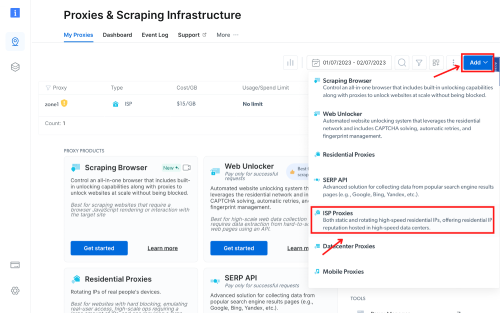
Create a Zone in Bright Data:
Initiate the integration process with Proxifier by creating a zone as per your requirements. For this guide, we’re creating an ISP zone with a dedicated IP. Ensure to include your targeted domains or opt for the “All domains” setting for multiple site targeting.
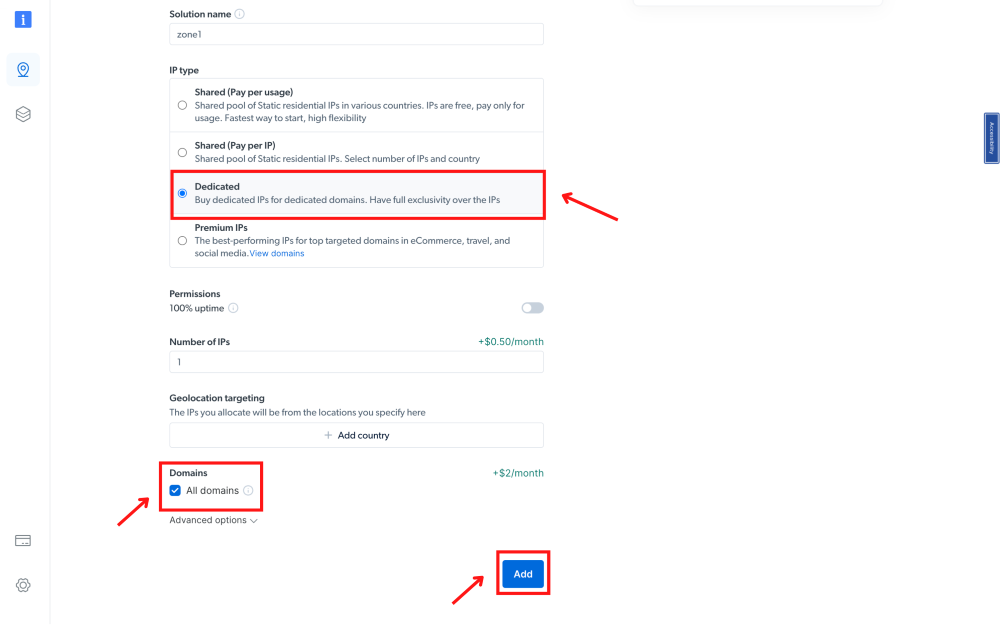
Example Zone Setting:
Take a look at the attached example.
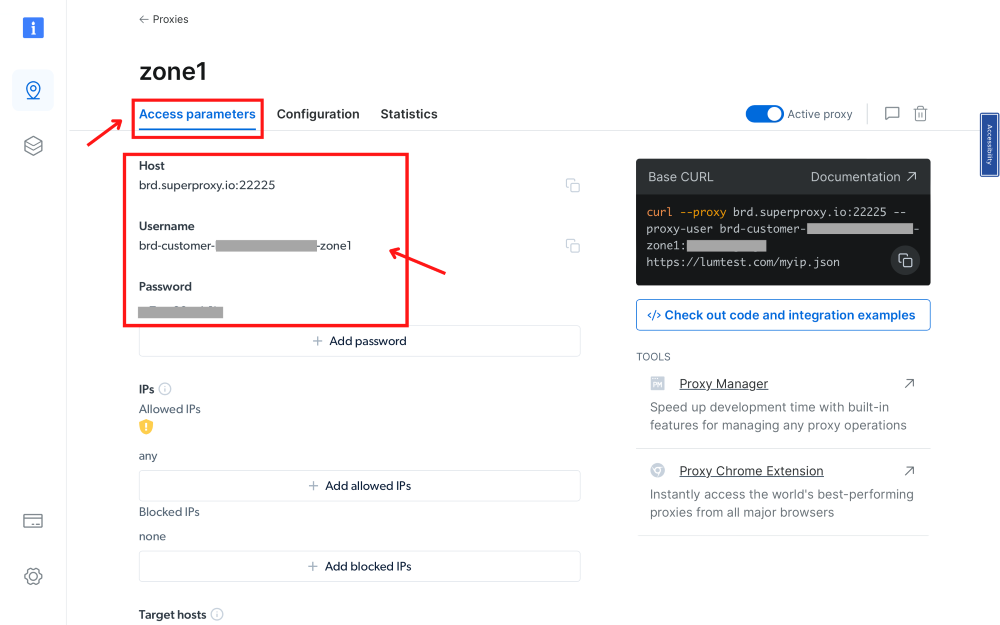
Procure Access Parameters:
Navigate to Bright Data’s Proxies & Scraping Infrastructure, select the created zone, and obtain the access parameters. Keep this tab open as these credentials will be needed shortly.
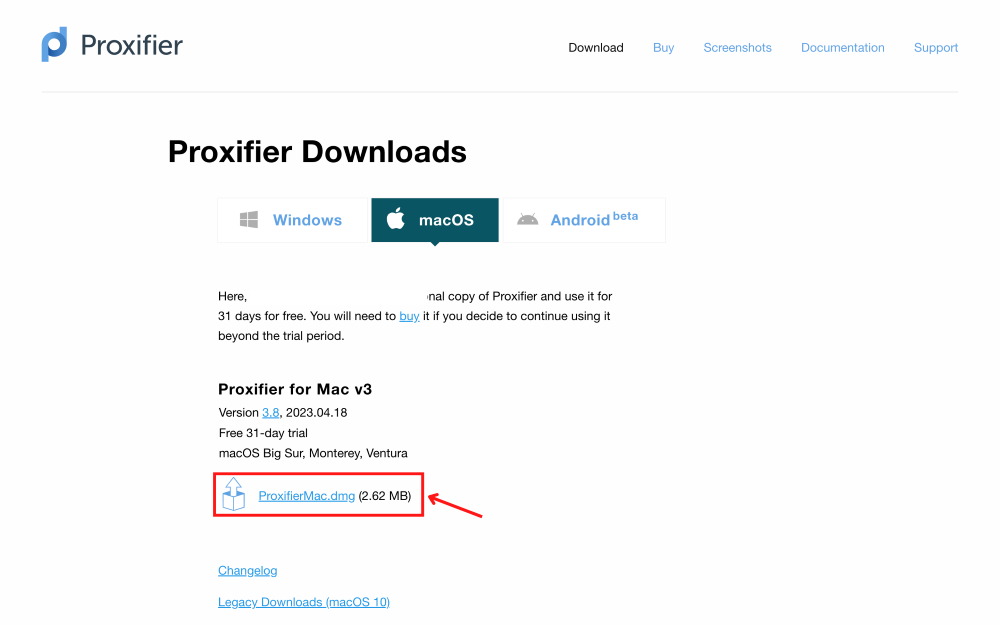
Install Proxifier:
Download and install the Proxifier application suitable for your operating system.
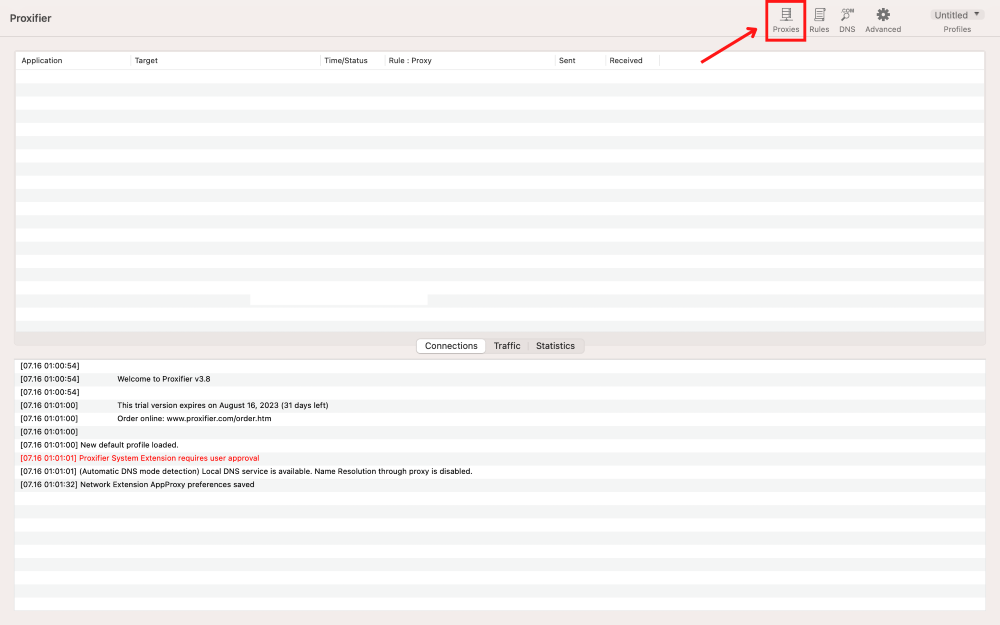
Access Proxies:
In the Proxifier interface, click on the proxy icon located at the top right.
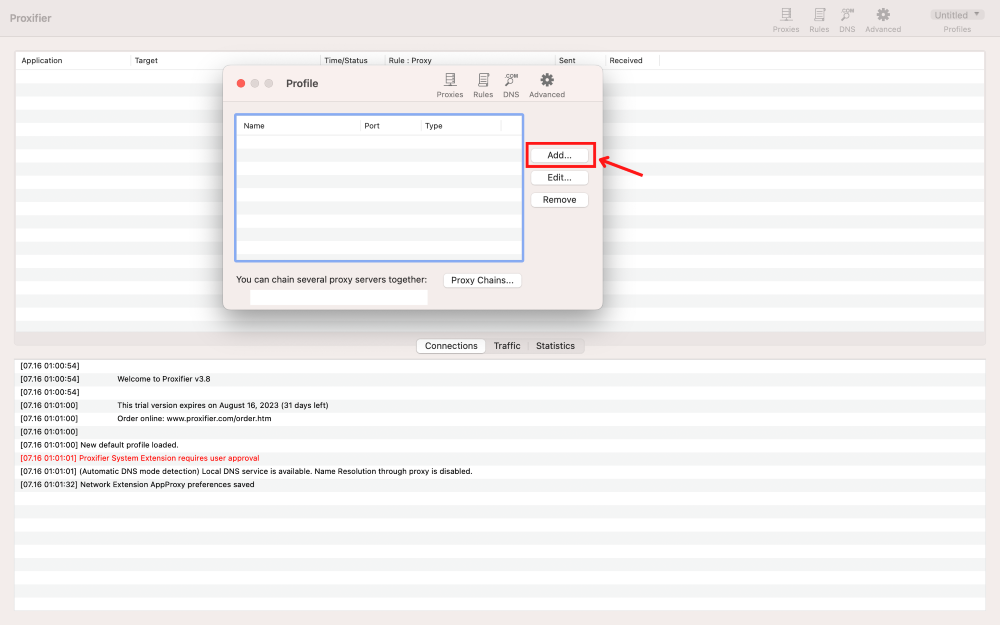
Add Proxies:
Click on the ‘Add’ button to include proxies.
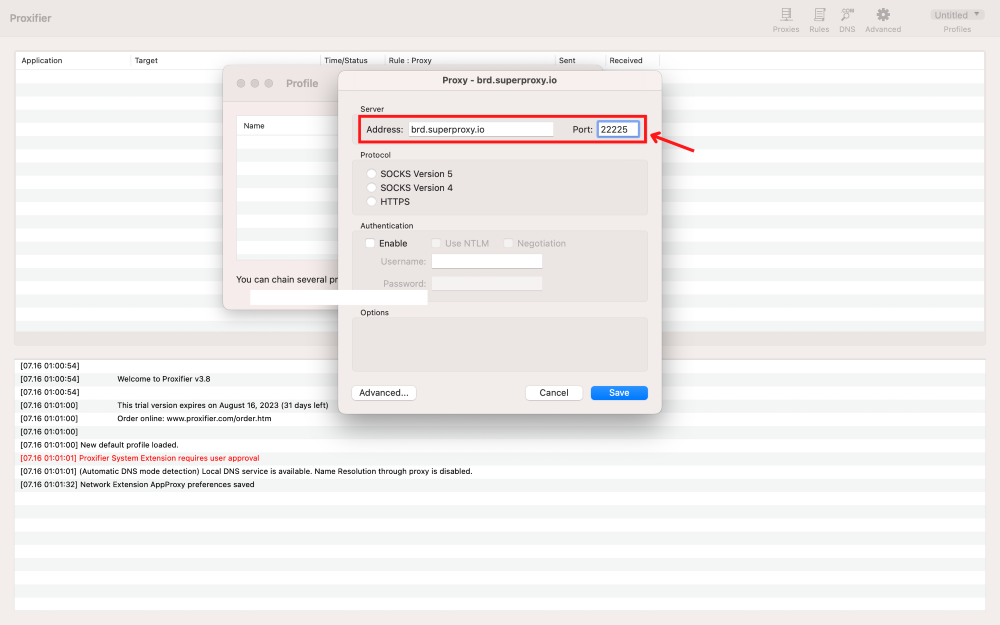
Input Proxy Server and Port:
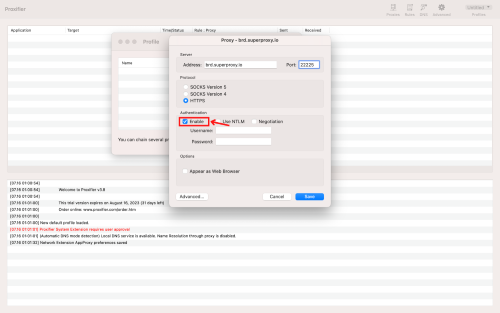
- Specify the server as brd.superproxy.io
- Port as 33335 for Bright Data proxies.
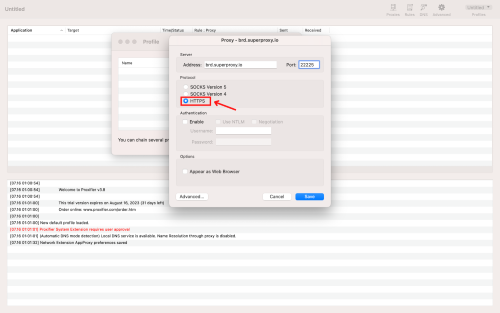
Choose Protocol:
In the Protocol section, select ‘HTTPS’.
Enable Authentication:
Check the ‘Enable’ box under the authentication section.
Copy Proxy Credentials:
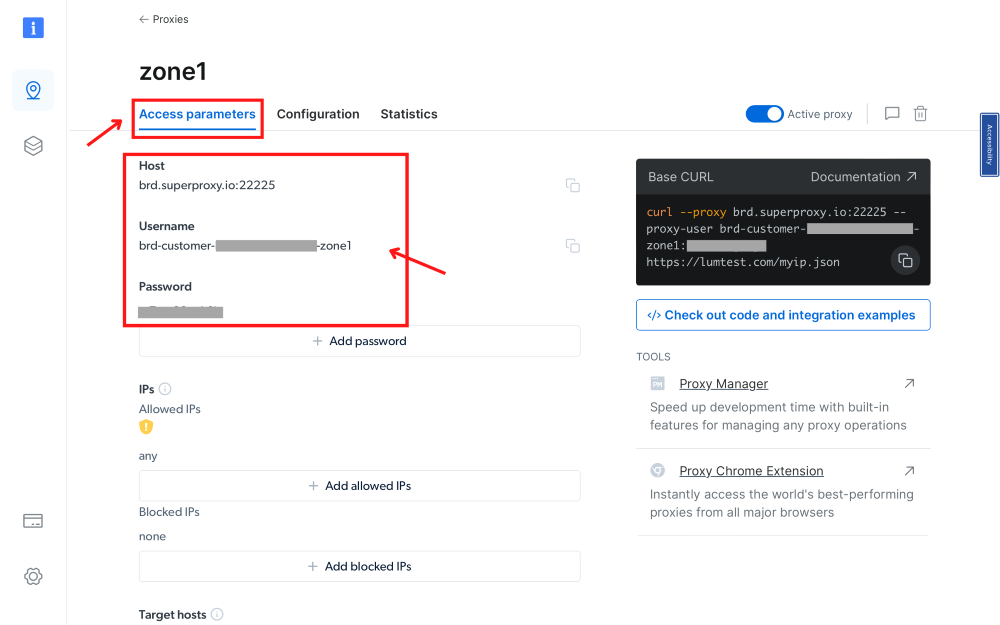
Go back to the Bright Data “Proxies & Scraping Infra”, select the proxy zone you’re using, click on the “Access parameter” option, and copy the provided Username and Password.
Input Proxy Credentials in Proxifier:
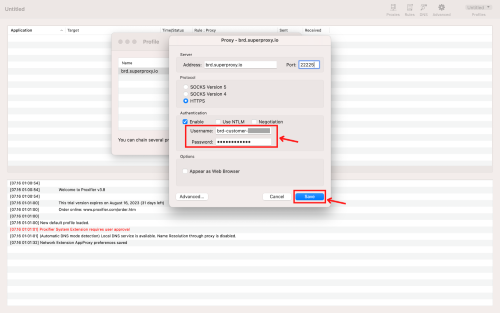
Return to Proxifier and paste the copied credentials into the appropriate fields, then click ‘Save’.
Set Default Proxy (Optional):
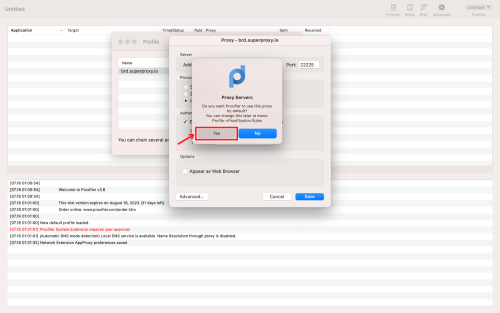
Confirm adding the proxy as default if you want immediate usage. This setting can be changed later under Profile->Proxification Rules.
Begin Browsing:
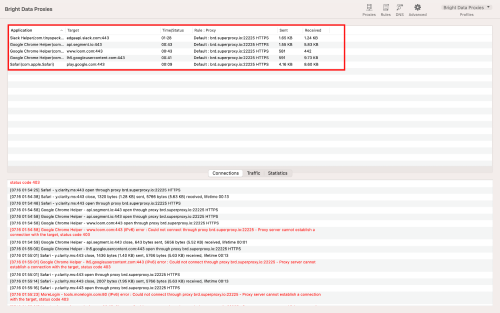
Open your browser. All traffic will now be redirected to the proxy, visible in the logs.
Verify Proxy Usage:
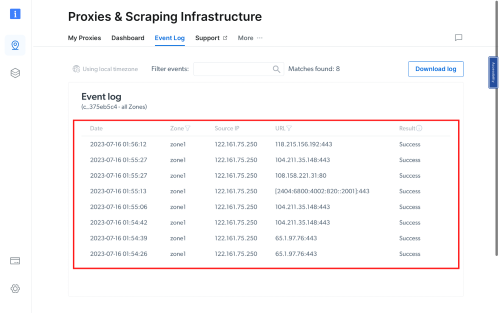
To ensure your Bright Data proxy is in use, check the Event Log section in your Proxies & Scraping Infrastructure dashboard.
⚠️Important note! If you are using Bright Data’s Residential Proxies, Web Unlocker or SERP API, you need to install an SSL certificate to enable end-to-end secure connections to your target website(s). This is a simple process, see https://docs.brightdata.com/general/account/ssl-certificate#installation-of-the-ssl-certificate for instructions.
Conclusion
To wrap up, setting up Bright Data proxies with Proxifier is a simple way to improve your online experience. With Proxifier’s ability to redirect any internet app through a proxy, and Bright Data’s secure service, you gain more control and flexibility. This combination offers better speed, privacy, and allows you to manage your internet activities easily. It’s a smart choice for all internet users.
Get proxies for Proxifier
수상 경력에 빛나는 프록시 인프라로 구동됩니다
400 million개 이상의 주거용 IP, 최고 수준의 기술력, 그리고 국가, 도시, 우편번호, 통신사, ASN을 대상으로 할 수 있는 능력은 저희 프리미엄 프록시 서비스를 개발자들에게 최고의 선택이 되게 합니다.


모든 개발 경로를 위한 프록시
네트워크, 피어, IP를 자유롭게 조합하여 지속적인 웹 데이터 흐름을 최적화하세요.


Proxy Network Pricing


- 무제한 확장성
- 무제한 좌석
- 프리미엄 SLA
- 99.99% 네트워크 가동 시간
- 무료 프록시 관리자
- 완전한 데이터 커버리지
- GB당 맞춤형 가격
- 맞춤형 솔루션
- 무제한 확장성
- 무제한 좌석
- 프리미엄 SLA
- 99.99% 네트워크 가동 시간
- 무료 프록시 관리자
- 완전한 데이터 커버리지
- GB당 맞춤형 가격
- 맞춤형 솔루션
- 무제한 확장성
- 무제한 좌석
- 프리미엄 SLA
- 99.99% 네트워크 가동 시간
- 무료 프록시 관리자
- 완전한 데이터 커버리지
- GB당 맞춤형 가격
- 맞춤형 솔루션
- 무제한 확장성
- 무제한 좌석
- 프리미엄 SLA
- 99.99% 네트워크 가동 시간
- 무료 프록시 관리자
- 완전한 데이터 커버리지
- GB당 맞춤형 가격
- 맞춤형 솔루션

프록시 및 데이터 수집 분야의 선도 기업

650 매일 수집되는 공개 데이터 TB

매일 새로운 기능이 출시됩니다

세계 최고의 대학 7/10개 제공

업계 최고의 고객 경험
매일 새로운 기능이 출시됩니다
필요할 때 바로 질문에 답변하기 위해
실시간 네트워크 성능 대시보드
성능 최적화를 위해
데이터 수집 목표를 달성하기 위해