


Shadowrocket Proxy Integration
Pairing Shadowrocket with Bright Data proxies optimizes your web scraping by providing robust and secure proxy management for efficient data extraction.
This guide may be outdated. For an up-to-date guide please see our documentation.

- 400M+ Residential IPs
- Sticky and rotating sessions
- 99.95% success rate
- Geo-location targeting - FREE
What is Shadowrocket?
Shadowrocket is a specialized utility app tailored for iPhones and iPads that ensures all internet traffic navigates through proxy servers. As a proficient proxy client, it empowers applications to effectively utilize proxies, making it an indispensable tool for iOS users seeking a streamlined proxy experience.
Why use Shadowrocket?
Shadowrocket boasts a plethora of features designed to enhance user convenience and online safety. Users can capture all web traffic from their devices, record HTTP, HTTPS, and DNS requests, and set up rules based on various criteria like domain matches or GeoIP lookups. Additionally, the app provides traffic measurement tools, ad-blocking capabilities, and even supports multiple plugins like kcptun and v2ray. With its ability to work on cellular networks, decrypt HTTPS traffic, and its comprehensive IPv6 support, Shadowrocket stands out as a versatile and robust proxy utility client for iOS devices.
How Bright Data Proxies Integrate With Shadowrocket
Steps to integrate Bright Data Proxies with Shadowrocket after signing up on the Bright Data platform
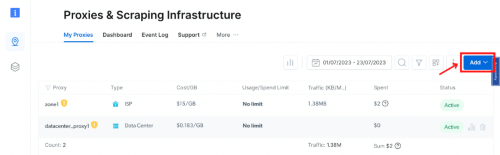
Zone Configuration:
In the Bright Data’s dashboard, navigate to the “Proxy & Scraping Infrastructure” section and Add a new designated Zone for your proxy usage.
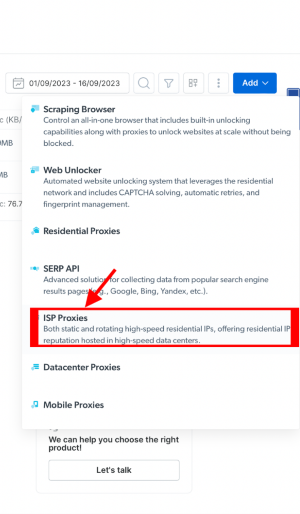
Select proxy type:
Here we will show ISP proxies option.
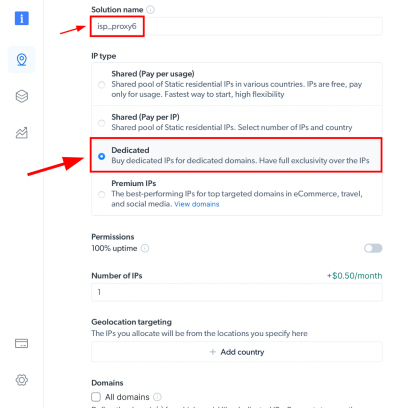
IP Type and Location Selection:
Name your solution. Set the IP type and choose the desired country and city for the IP location.
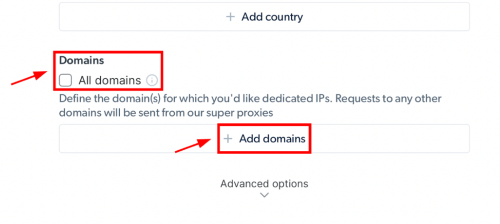
Specifiy domains:
Or use ‘All domains’ for one IP to target websites using the same IP.
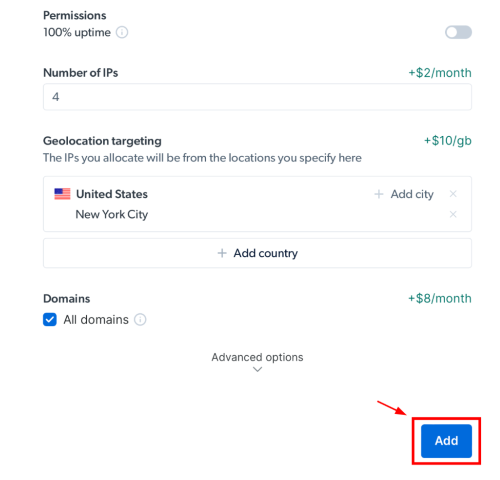
Create zone:
Click the “Add” button to create the Zone.
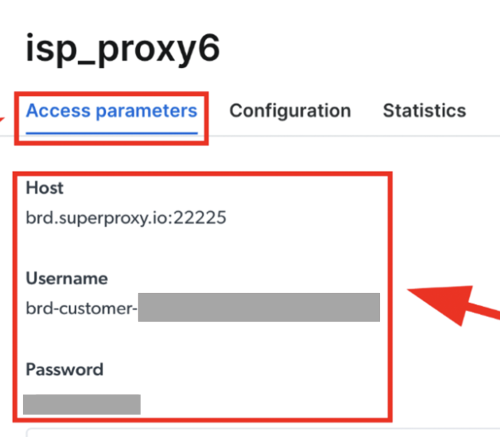
Accessing proxy details:
Click on the name of your Zone, navigate to the “Access Parameters” tab, and note down the proxy credentials:
- host
- port
- username
- password
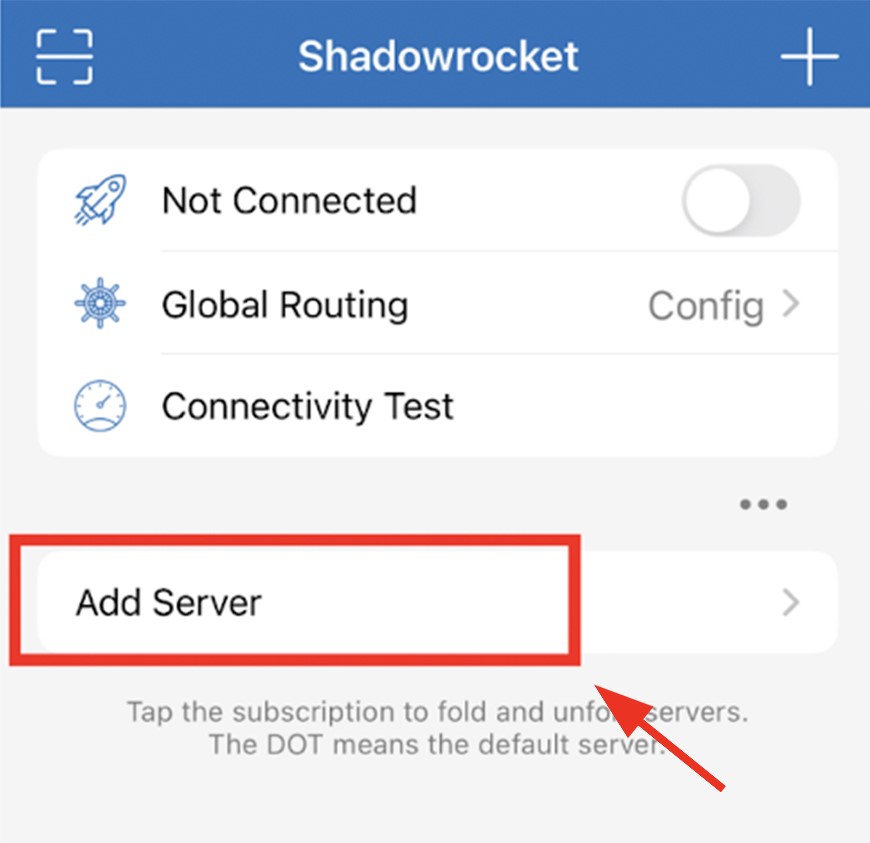
Download Shadowrocket:
Download Shadowrocket from the App Store. Luanch the app and select “Add Server“.
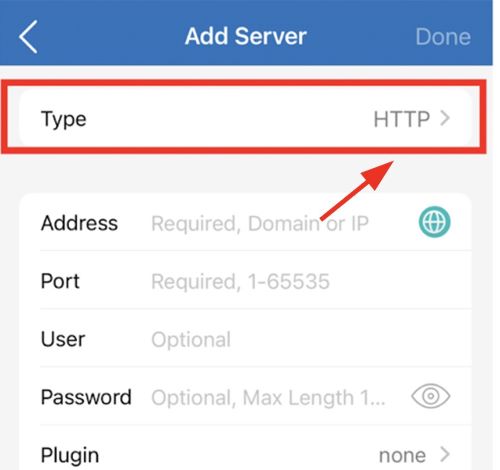
Proxy Configuration:
- Under the “Type” menu, switch to “HTTP.”
- For “Address“, input “brd.superproxy.io“
- If using the proxy manager, use “127.0.0.1” instead.
- Set the “Port” as “33335.”
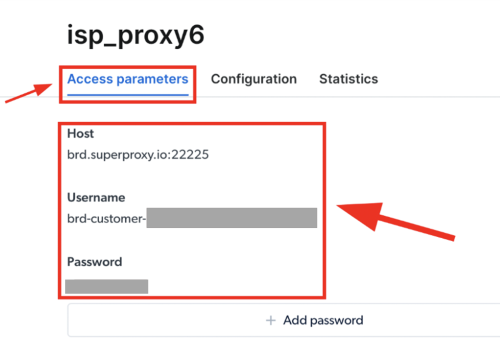
User name & password:
Retrieve the “Username” and “Password” from your designated Bright Data zone Access parameters settings.
User name & password:
Retrieve the “Username” and “Password” from your designated Bright Data zone Access parameters settings.
Input the “Username” in the “User” field and the “Password” in the “Password” field, then click “Done.”
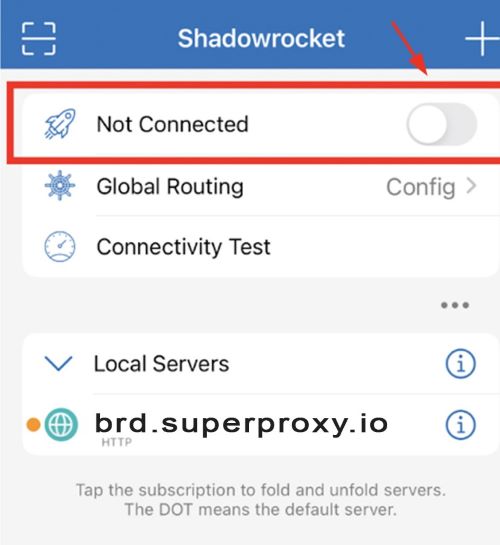
Activation and VPN Setup:
- Toggle the “Not Connected” switch to activate.
- If it’s your first time, you’ll be prompted to install the VPN Profile. Click “Ok.”
- A secondary prompt will appear: “Shadowrocket would like to add VPN configuration.” Tap “Allow.”
⚠️Important note: If you are using Bright Data’s Residential Proxies, Web Unlocker or SERP API, you need to install an SSL certificate to enable end-to-end secure connections to your target website(s). This is a simple process, see https://docs.brightdata.com/general/account/ssl-certificate#installation-of-the-ssl-certificate for instructions.
Get proxies for Shadowrocket
수상 경력에 빛나는 프록시 인프라로 구동됩니다
400 million개 이상의 주거용 IP, 최고 수준의 기술력, 그리고 국가, 도시, 우편번호, 통신사, ASN을 대상으로 할 수 있는 능력은 저희 프리미엄 프록시 서비스를 개발자들에게 최고의 선택이 되게 합니다.
모든 개발 경로를 위한 프록시
네트워크, 피어, IP를 자유롭게 조합하여 지속적인 웹 데이터 흐름을 최적화하세요.


Proxy Network Pricing


- 무제한 확장성
- 무제한 좌석
- 프리미엄 SLA
- 99.99% 네트워크 가동 시간
- 무료 프록시 관리자
- 완전한 데이터 커버리지
- GB당 맞춤형 가격
- 맞춤형 솔루션
- 무제한 확장성
- 무제한 좌석
- 프리미엄 SLA
- 99.99% 네트워크 가동 시간
- 무료 프록시 관리자
- 완전한 데이터 커버리지
- GB당 맞춤형 가격
- 맞춤형 솔루션
- 무제한 확장성
- 무제한 좌석
- 프리미엄 SLA
- 99.99% 네트워크 가동 시간
- 무료 프록시 관리자
- 완전한 데이터 커버리지
- GB당 맞춤형 가격
- 맞춤형 솔루션
- 무제한 확장성
- 무제한 좌석
- 프리미엄 SLA
- 99.99% 네트워크 가동 시간
- 무료 프록시 관리자
- 완전한 데이터 커버리지
- GB당 맞춤형 가격
- 맞춤형 솔루션

프록시 및 데이터 수집 분야의 선도 기업

650 매일 수집되는 공개 데이터 TB

매일 새로운 기능이 출시됩니다

세계 최고의 대학 7/10개 제공
