타겟은 현재 스크래핑하기 가장 어려운 이커머스 사이트 중 하나입니다. 동적 CSS 선택자, 지연 로딩 콘텐츠, 강력한 차단 시스템으로 인해 불가능해 보일 수 있습니다. 이 가이드를 마치면 전문가처럼 타겟을 스크래핑할 수 있게 될 것입니다. 제품 목록을 추출하는 두 가지 방법을 다룰 것입니다.
- 파이썬과 Scraping Browser로 Target 스크래핑하는 방법
- Claude와 Bright Data의 MCP 서버를 사용한 Target 스크래핑 방법
파이썬으로 타겟 스크래핑하는 방법
파이썬을 사용해 타겟 목록을 수동으로 스크래핑하는 과정을 살펴보겠습니다. 타겟의 콘텐츠는 동적으로 로드되므로 헤드리스 브라우저 없이는 결과가 불완전한 경우가 많습니다. 먼저 Requests와 BeautifulSoup을 사용해 진행한 후, Selenium으로 콘텐츠를 추출하는 방법을 살펴보겠습니다.
사이트 검사
코딩을 시작하기 전에 타겟의 결과 페이지를 실제로 검사해야 합니다. 페이지를 검사하면 모든 제품 카드에 @web/site-top-of-funnel/ProductCardWrapper라는 data-test 값이 포함되어 있음을 확인할 수 있습니다. 데이터를 추출할 때 이 값을 CSS 선택자로 사용할 것입니다.
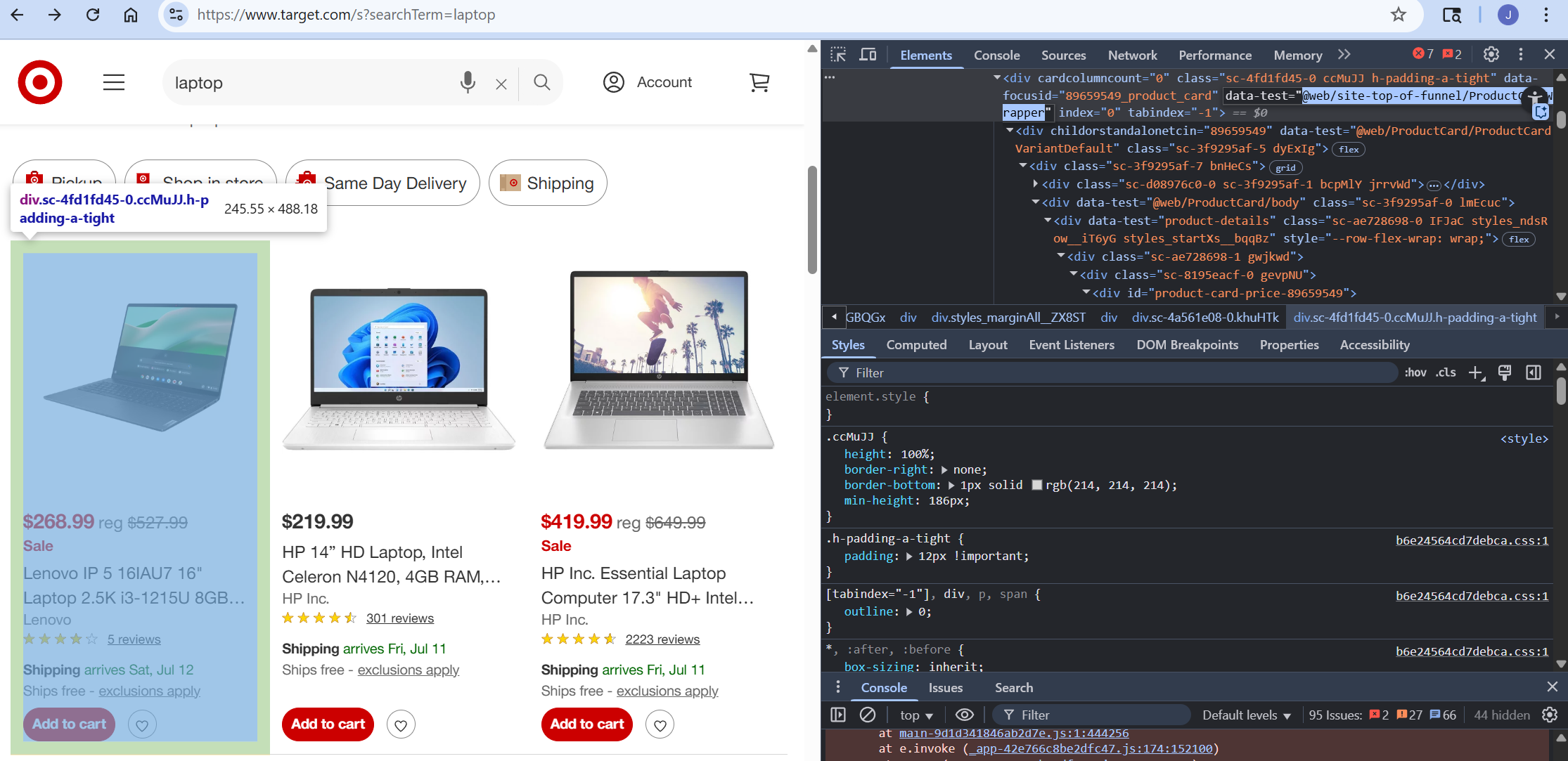
Python Requests와 BeautifulSoup이 작동하지 않을 수 있음
Requests와 BeautifulSoup이 설치되어 있지 않다면 pip를 통해 설치할 수 있습니다.
pip install requests beautifulsoup4아래 코드는 사용할 수 있는 기본 스크래퍼를 보여줍니다. Bright Data API 키와 application/json을 사용하여 헤더를 설정합니다. 데이터에는 영역 이름, 대상 URL, 형식 등 실제 구성이 포함됩니다. 제품 카드를 찾은 후 이를 반복 처리하여 각 제품의 제목, 링크, 가격을 추출합니다.
추출된 모든 제품은 배열에 저장되며, 스크래핑이 완료되면 이 배열을 JSON 파일로 작성합니다. 요소가 발견되지 않을 때의 continue 문에 유의하세요. 해당 요소 없이 페이지에 제품이 표시된다면, 아직 로딩이 완료되지 않은 것입니다. 브라우저 없이 페이지 렌더링을 통해 콘텐츠 로딩을 기다릴 수 없습니다.
import requests
from bs4 import BeautifulSoup
import json

#웹 언락커 API에 전송할 헤더
headers = {
    "Authorization": "your-bright-data-api-key",
    "Content-Type": "application/json"
}

#구성 정보
data = {
    "zone": "web_unlocker1",
    "url": "https://www.target.com/s?searchTerm=laptop",
    "format": "raw",
}

#API에 요청 전송
response = requests.post(
    "https://api.brightdata.com/request",
    json=data,
    headers=headers
)


#스크랩된 제품용 배열
scraped_products = []

card_selector = "@web/site-top-of-funnel/ProductCardWrapper"

#beautifulsoup으로 파싱
soup = BeautifulSoup(response.text, "html.parser")
cards = soup.select(f"div[data-test='{card_selector}']")

# 디버깅을 위해 발견된 카드 수 기록
print("products found", len(cards))


# 카드 반복 처리
for card in cards:
    # 상품 데이터 찾기
    # 상품이 아직 로드되지 않았다면 목록에서 제거

    listing_text = card.text
    link_element = card.select_one("a[data-test='product-title']")

    if not link_element:
        continue
    title = link_element.get("aria-label").replace(""")
    link = link_element.get("href")
    price = card.select_one("span[data-test='current-price'] span")
    if not price:
        continue

    product_info = {
        "title": title,
        "link": f"https://www.target.com{link}",
        "price": price.text
    }

    # 추출한 제품을 스크랩한 데이터에 추가
    scraped_products.append(product_info)

#추출된 데이터를 JSON 파일에 기록
with open("output.json", "w", encoding="utf-8") as file:
    json.dump(scraped_products, file, indent=4)
렌더링되지 않은 객체를 건너뛰면 추출된 데이터가 크게 제한됩니다. 아래 결과에서 볼 수 있듯이, 우리는 단 네 개의 완전한 결과만 추출할 수 있었습니다.
[
    {
        "title": "Lenovo LOQ 15 15.6" 1920 x 1080 FHD 144Hz 게이밍 노트북 Intel Core i5-12450HX 12GB RAM DDR5 512GB SSD NVIDIA GeForce RTX 3050 6GB 루나 그레이",
        "link": "https://www.target.com/p/lenovo-loq-15-15-6-1920-x-1080-fhd-144hz-gaming-laptop-intel-core-i5-12450hx-12gb-ram-ddr5-512gb-ssd-nvidia-geforce-rtx-3050-6gb-luna-grey/-/A-93972673#lnk=sametab",
        "price": "$569.99"
    },
    {
        "title": "레노버 플렉스 5i 14" WUXGA 2-in-1 터치스크린 노트북, 인텔 코어 i5-1235U, 8GB RAM, 512GB SSD, 인텔 아이리스 Xe 그래픽, 윈도우 11 홈",
        "link": "https://www.target.com/p/lenovo-flex-5i-14-wuxga-2-in-1-touchscreen-laptop-intel-core-i5-1235u-8gb-ram-512gb-ssd-intel-iris-xe-graphics-windows-11-home/-/A-91620960#lnk=sametab",
        "price": "$469.99"
    },
    {
        "title": "HP Envy x360 14" Full HD 2-in-1 터치스크린 노트북, 인텔 코어 i5-120U, 8GB RAM, 512GB SSD, Windows 11 Home",
        "link": "https://www.target.com/p/hp-envy-x360-14-full-hd-2-in-1-touchscreen-laptop-intel-core-5-120u-8gb-ram-512gb-ssd-windows-11-home/-/A-92708401#lnk=sametab",
        "price": "$569.99"
    },
    {
        "title": "HP Inc. Essential 노트북 컴퓨터 17.3" HD+ Intel Core 8 GB 메모리; 256 GB SSD",
        "link": "https://www.target.com/p/hp-inc-essential-laptop-computer-17-3-hd-intel-core-8-gb-memory-256-gb-ssd/-/A-92469343#lnk=sametab",
        "price": "$419.99"
    }
]
Requests와 BeautifulSoup을 사용하면 페이지에 접근할 수 있지만 모든 결과를 로드할 수는 없습니다.
Python Selenium을 이용한 스크래핑
페이지를 렌더링하려면 브라우저가 필요합니다. 이때 Selenium이 필요합니다. 아래 명령어를 실행하여 Selenium을 설치하세요.
pip install selenium아래 코드에서는 Scraping Browser를 사용하여 Selenium의 원격 인스턴스에 연결합니다. 여기서 실제 코드에 주목하세요. 여기서의 로직은 위 예제와 대체로 동일합니다. 아래에 보이는 추가 코드의 대부분은 오류 처리와 페이지 콘텐츠 로딩을 위한 사전 프로그래밍된 대기 시간입니다.
from selenium.webdriver import Remote, ChromeOptions
from selenium.webdriver.chromium.remote_connection import ChromiumRemoteConnection
from selenium.webdriver.common.by import By
from selenium.webdriver.support.ui import WebDriverWait
from selenium.webdriver.support import expected_conditions as EC
from selenium.common.exceptions import NoSuchElementException, TimeoutException
import json
import time
import sys

AUTH = 'brd-customer-<your-username>-zone-<your-zone-name>:<your-password>'
SBR_WEBDRIVER = f'https://{AUTH}@brd.superproxy.io:9515'

def safe_print(*args):
    # 윈도우 터미널에서 안전한 ASCII만 출력하도록 강제
    text = " ".join(str(arg) for arg in args)
    try:
        sys.stdout.write(text + 'n')
    except UnicodeEncodeError:
        sys.stdout.write(text.encode('ascii', errors='replace').decode() + 'n')

#실제 실행 코드
def main():

    #스크래핑된 상품 배열
    scraped_products = []
    card_selector = "@web/site-top-of-funnel/ProductCardWrapper"

    safe_print('Bright Data SBR 브라우저 API에 연결 중...')

    #스크래핑 브라우저용 원격 연결 설정
    sbr_connection = ChromiumRemoteConnection(SBR_WEBDRIVER, 'goog', 'chrome')

    #스크래핑 브라우저 실행
    with Remote(sbr_connection, options=ChromeOptions()) as driver:
        safe_print('연결 완료! 이동 중...')
        driver.get("https://www.target.com/s?searchTerm=laptop")

        #항목 로딩을 위한 30초 타임아웃 설정
        wait = WebDriverWait(driver, 30)

        safe_print('초기 제품 카드 대기 중...')
        try:
            wait.until(
                EC.presence_of_element_located((By.CSS_SELECTOR, f"div[data-test='{card_selector}']"))
            )
        except TimeoutException:
            safe_print("상품 카드 전혀 로드되지 않음 — 차단 또는 사이트 구조 변경 가능성.")
            return

        # 스크롤 계산을 위한 문서 높이 획득
        safe_print('픽셀 단위 스크롤 루프 시작...')
        last_height = driver.execute_script("return document.body.scrollHeight")
        scroll_attempt = 0
        max_scroll_attempts = 10

        # 페이지를 부드럽게 아래로 스크롤
        while scroll_attempt < max_scroll_attempts:
            driver.execute_script("window.scrollBy(0, window.innerHeight);")
            time.sleep(1.5)
            new_height = driver.execute_script("return document.body.scrollHeight")
            if new_height == last_height:
                safe_print("페이지 하단에 도달했습니다.")
                break
            last_height = new_height
            scroll_attempt += 1

        safe_print("스크롤 완료 — 세션 유지를 위한 최종 안정화 조정 중...")
        try:
            for _ in range(5):
                driver.execute_script("window.scrollBy(0, -50); window.scrollBy(0, 50);")
                time.sleep(1)
        except Exception as e:
            safe_print(f"최종 정착 중 연결 종료: {type(e).__name__} — {e}")
            return

        #이제 모든 것이 로드되었으니 제품 카드를 찾습니다
        safe_print("제품 카드 스크래핑 중...")
        try:
            product_cards = driver.find_elements(By.CSS_SELECTOR, f"div[data-test='{card_selector}']")
            safe_print(f"{len(product_cards)}개의 카드를 찾았습니다.")
        except Exception as e:
            safe_print(f"상품 카드 찾기 실패: {type(e).__name__} — {e}")
            return

        #빈 카드는 제외하고 나머지 카드에서 데이터 추출
        for card in product_cards:
            inner_html = card.get_attribute("innerHTML").strip()
            if not inner_html or len(inner_html) < 50:
                continue

            safe_print("n--- 카드 HTML (중략) ---n", inner_html[:200])

            try:
                link_element = card.find_element(By.CSS_SELECTOR, "a[data-test='product-title']")
                title = link_element.get_attribute("aria-label") or link_element.text.strip()
                link = link_element.get_attribute("href")
            except NoSuchElementException:
                safe_print("카드에서 링크 요소를 찾을 수 없음, 건너뜀.")
                continue

            try:
                price_element = card.find_element(By.CSS_SELECTOR, "span[data-test='current-price'] span")
                price = price_element.text.strip()
            except NoSuchElementException:
                price = "N/A"

            product_info = {
                "title": title,
                "link": f"https://www.target.com{link}" if link and link.startswith("/") else link,
                "price": price
            }
            scraped_products.append(product_info)

    #추출된 제품들을 json 파일에 기록
    if scraped_products:
        with open("scraped-products.json", "w", encoding="utf-8") as file:
            json.dump(scraped_products, file, indent=2)
        safe_print(f"완료! {len(scraped_products)}개의 상품을 scraped-products.json에 저장했습니다")
    else:
        safe_print("추출된 상품 없음 — 저장할 내용이 없습니다.")

if __name__ == '__main__':
    main()
보시다시피 Selenium을 사용하면 더 완벽한 결과를 얻을 수 있습니다. 네 개의 목록 대신 여덟 개를 추출할 수 있습니다. 이는 첫 번째 시도보다 훨씬 나은 결과입니다.
[
  {
    "title": "Lenovo LOQ 15 15.6" 1920 x 1080 FHD 144Hz 게이밍 노트북 Intel Core i5-12450HX 12GB RAM DDR5 512GB SSD NVIDIA GeForce RTX 3050 6GB 루나 그레이",
    "link": "https://www.target.com/p/lenovo-loq-15-15-6-1920-x-1080-fhd-144hz-gaming-laptop-intel-core-i5-12450hx-12gb-ram-ddr5-512gb-ssd-nvidia-geforce-rtx-3050-6gb-luna-grey/-/A-93972673#lnk=sametab",
    "price": "$569.99"
  },
  {
    "title": "레노버 플렉스 5i 14" WUXGA 2-in-1 터치스크린 노트북, 인텔 코어 i5-1235U, 8GB RAM, 512GB SSD, 인텔 아이리스 Xe 그래픽, 윈도우 11 홈",
    "link": "https://www.target.com/p/lenovo-flex-5i-14-wuxga-2-in-1-touchscreen-laptop-intel-core-i5-1235u-8gb-ram-512gb-ssd-intel-iris-xe-graphics-windows-11-home/-/A-91620960#lnk=sametab",
    "price": "$469.99"
  },
  {
    "title": "HP Inc. Essential 노트북 컴퓨터 15.6" HD 인텔 코어 i5 8 GB 메모리; 256 GB SSD",
    "link": "https://www.target.com/p/hp-inc-essential-laptop-computer-15-6-hd-intel-core-i5-8-gb-memory-256-gb-ssd/-/A-1002589475#lnk=sametab",
    "가격": "$819.99"
  },
  {
    "제목": "HP Envy x360 14" 풀 HD 2-in-1 터치스크린 노트북, 인텔 코어 i5-120U, 8GB RAM, 512GB SSD, Windows 11 Home",
    "link": "https://www.target.com/p/hp-envy-x360-14-full-hd-2-in-1-touchscreen-laptop-intel-core-5-120u-8gb-ram-512gb-ssd-windows-11-home/-/A-92708401#lnk=sametab",
    "price": "$569.99"
  },
  {
    "title": "레노버 리전 프로 7i 16" WQXGA OLED 240Hz 게이밍 노트북 인텔 코어 울트라 9 275HX 32GB RAM 1TB SSD NVIDIA 지포스 RTX 5070Ti 이클립스 블랙",
    "link": "https://www.target.com/p/lenovo-legion-pro-7i-16-wqxga-oled-240hz-gaming-notebook-intel-core-ultra-9-275hx-32gb-ram-1tb-ssd-nvidia-geforce-rtx-5070ti-eclipse-black/-/A-1002300555#lnk=sametab",
    "price": "$2,349.99"
  },
  {
    "title": "레노버 LOQ 15.6" 1920 x 1080 FHD 144Hz 게이밍 노트북 인텔 코어 i5-12450HX 12GB DDR5 512GB SSD 엔비디아 지포스 2050 4GB DDR6 루나 그레이",
    "link": "https://www.target.com/p/lenovo-loq-15-6-1920-x-1080-fhd-144hz-gaming-notebook-intel-core-i5-12450hx-12gb-ddr5-512gb-ssd-nvidia-geforce-2050-4gb-ddr6-luna-grey/-/A-1000574845#lnk=sametab",
    "price": "$519.99"
  },
  {
    "title": "HP Envy x360 14u201d WUXGA 2-in-1 터치스크린 노트북, AMD Ryzen 5 8640HS, 16GB RAM, 512GB SSD, Windows 11 Home",
    "link": "https://www.target.com/p/hp-envy-x360-14-wuxga-2-in-1-touchscreen-laptop-amd-ryzen-5-8640hs-16gb-ram-512gb-ssd-windows-11-home/-/A-92918585#lnk=sametab",
    "price": "$669.99"
  },
  {
    "title": "에이서 에스파이어 3 - 15.6" 터치스크린 노트북 AMD 라이젠 5 7520U 2.80GHz 16GB RAM 1TB SSD W11H - 제조사 리퍼비시드",
    "link": "https://www.target.com/p/acer-aspire-3-15-6-touchscreen-laptop-amd-ryzen-5-7520u-2-80ghz-16gb-1tb-w11h-manufacturer-refurbished/-/A-93221896#lnk=sametab",
    "price": "$299.99"
  }
]
여기서 얻은 결과는 더 나아졌지만, 더 적은 작업과 코드 없이도 더 개선할 수 있습니다.
Claude로 타겟 스크래핑하는 방법
다음으로, Bright Data의 MCP 서버를 사용해 Claude로 동일한 작업을 수행해 보겠습니다. Claude Desktop을 열어 시작하세요. 웹 언락커(Web Unlocker)와 스크래핑 브라우저(Scraping Browser) 존이 활성화되어 있는지 확인하세요. MCP 서버에는 스크래핑 브라우저가 필수적이지 않지만, Target은 브라우저가 필요합니다.
MCP 연결 구성
Claude Desktop에서 “파일”을 클릭하고 “설정”을 선택하세요. “개발자”를 클릭한 후 “구성 편집”을 선택하세요. 아래 코드를 복사하여 구성 파일에 붙여넣으세요. API 키와 존 이름을 본인의 것으로 반드시 교체하세요.
{
  "mcpServers": {
    "Bright Data": {
      "command": "npx",
      "args": ["@brightdata/mcp"],
      "env": {
        "API_TOKEN": "<your-brightdata-api-token>",
        "WEB_UNLOCKER_ZONE": "<선택 사항—기본 영역 이름 'mcp_unlocker' 재정의>",
        "BROWSER_AUTH": "<선택 사항—스크래핑 브라우저를 통한 완전한 브라우저 제어 활성화>"
      }
    }
  }
}
설정을 저장하고 Claude를 재시작한 후 개발자 설정을 열면 Bright Data가 옵션으로 표시됩니다. Bright Data를 클릭하여 구성을 확인하면 아래 이미지와 유사하게 표시됩니다.
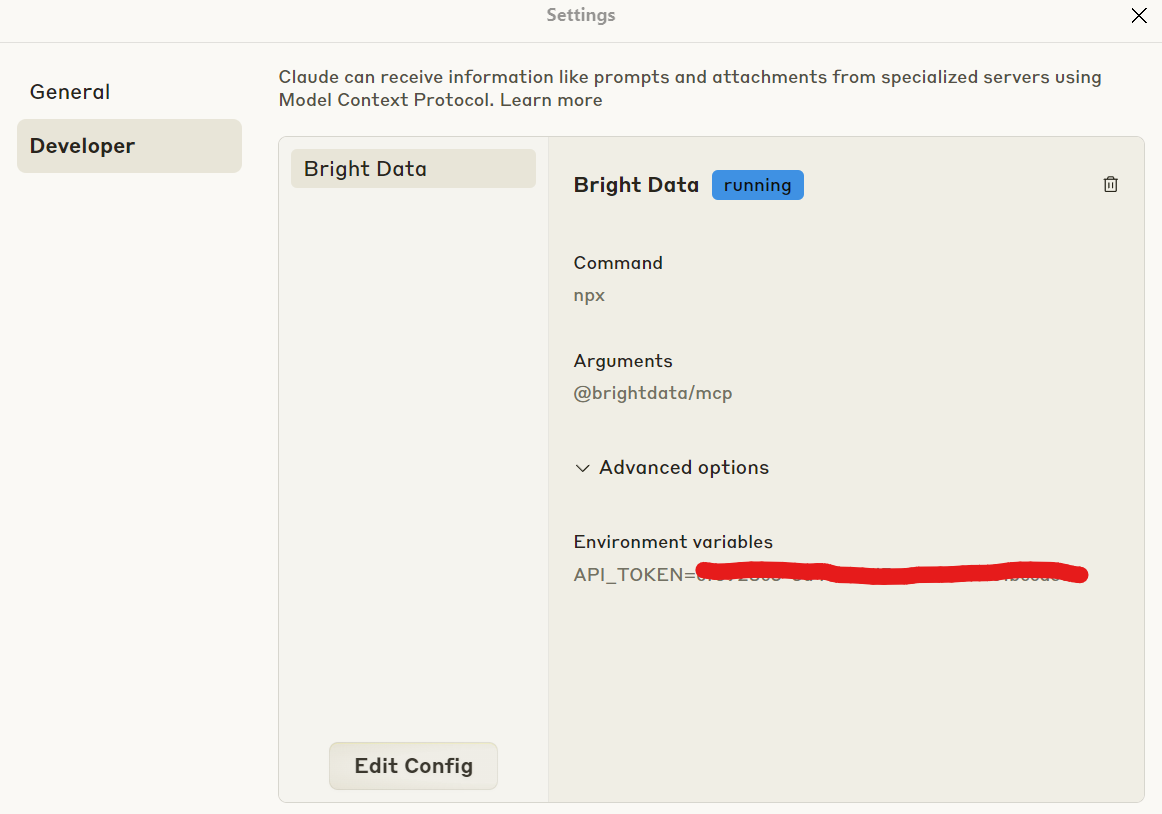
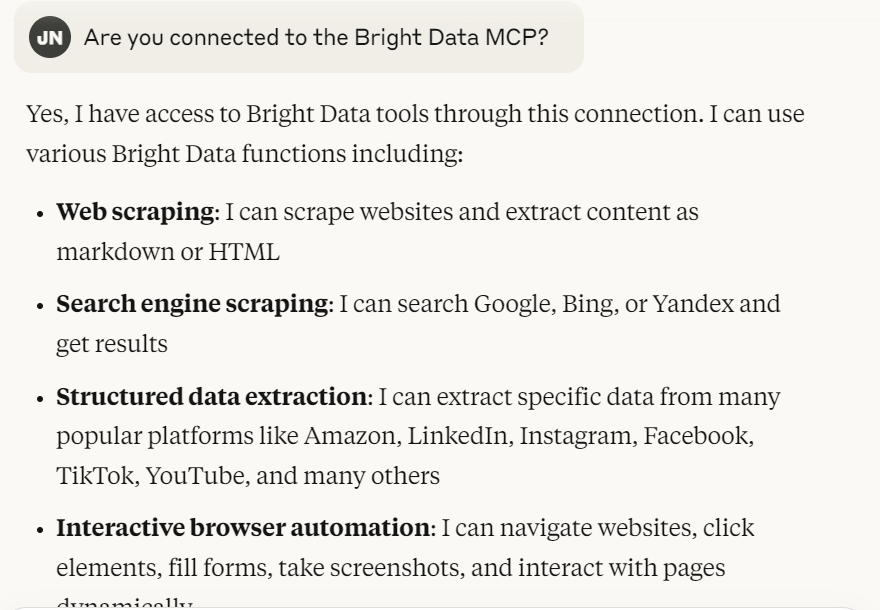
연결 후 Claude가 MCP 서버에 접근할 수 있는지 확인하세요. 아래 프롬프트가 정상적으로 표시되면 됩니다.
Bright Data MCP에 연결되어 있나요?
모든 설정이 완료되면 Claude는 아래 이미지와 유사하게 응답합니다. 연결을 확인한 후 수행 가능한 작업을 설명합니다.
실제 스크래핑 실행
이 단계부터 작업은 간단합니다. Claude에게 대상 목록 URL을 제공하면 자동으로 작업을 수행합니다. 아래와 같은 프롬프트가 정상적으로 작동합니다.
https://www.target.com/s?searchTerm=laptop에서 노트북을 추출해 주세요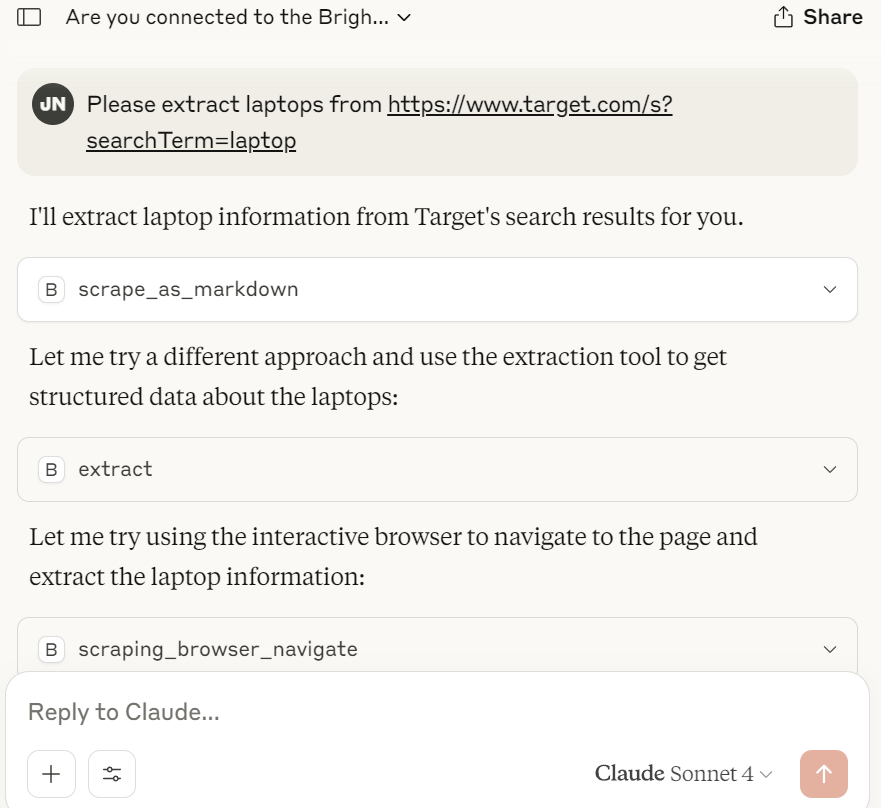
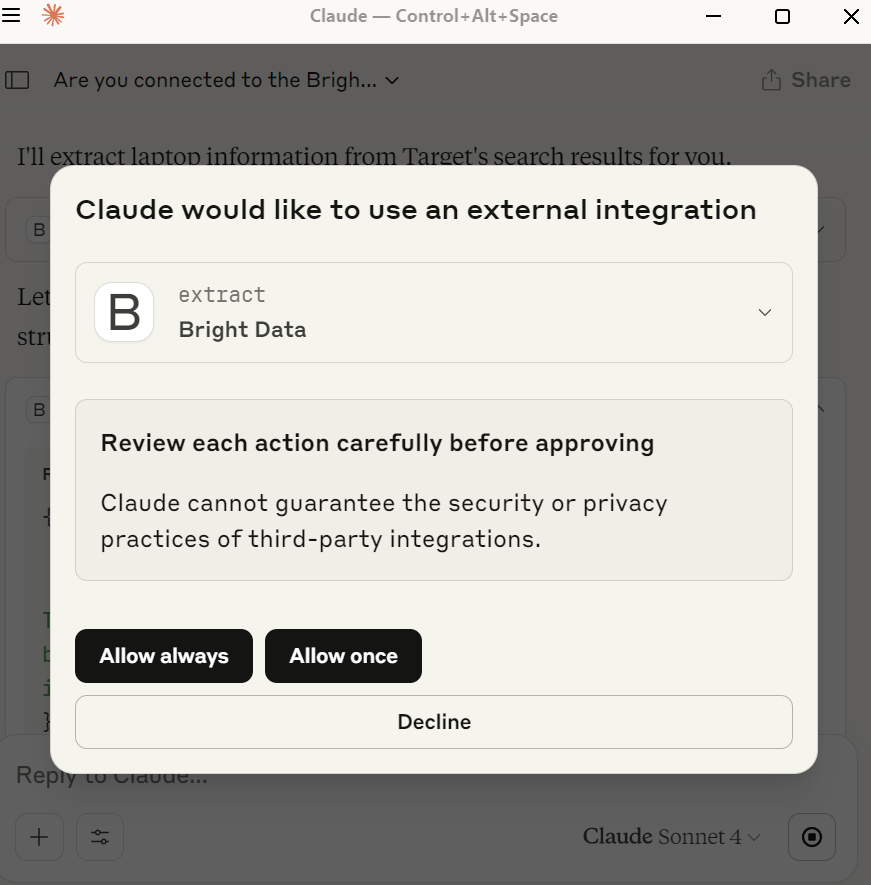
이 과정에서 Claude가 특정 도구를 사용해도 되는지 묻는 팝업이 표시될 수 있습니다. 이는 유용한 보안 기능입니다. 명시적으로 권한을 부여하지 않으면 Claude는 해당 도구를 사용하지 않습니다.
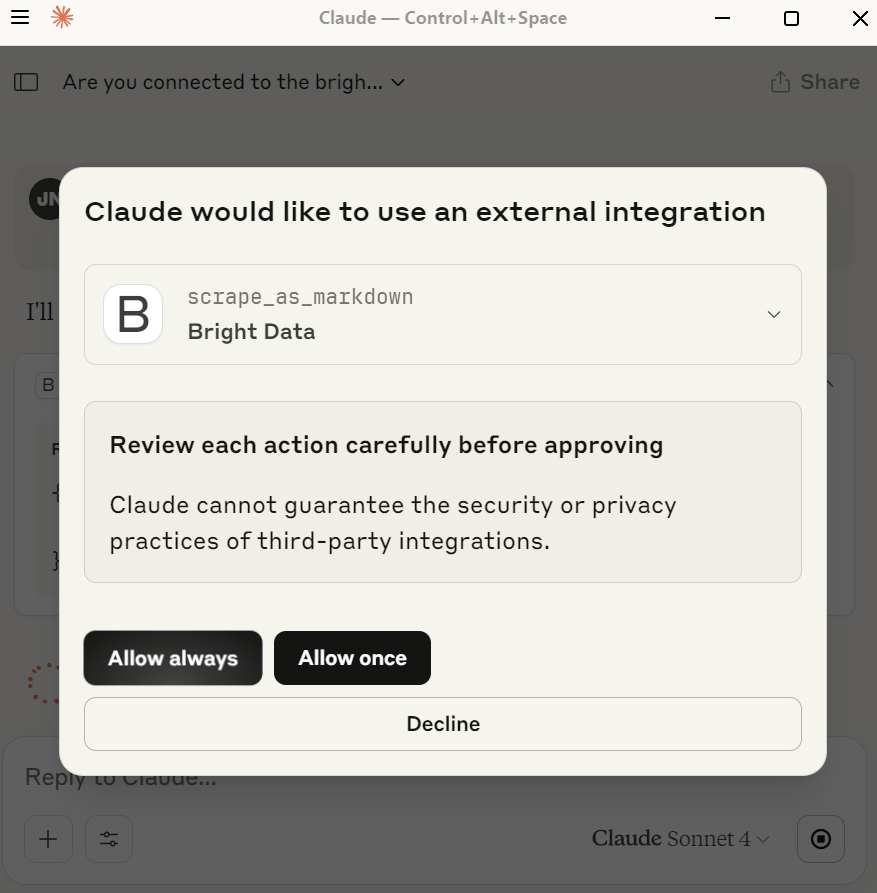
Claude는 scrape_as_markdown, extract 등 몇 가지 도구 사용 권한을 요청할 것입니다. 도구 사용을 반드시 허용하세요. 그렇지 않으면 결과를 스크래핑할 수 없습니다.
결과 저장
다음으로 클로드에게 결과를 JSON 파일로 저장하도록 요청하세요. 몇 초 안에 클로드가 추출한 모든 결과를 매우 상세하고 체계적인 JSON 파일에 기록할 것입니다.
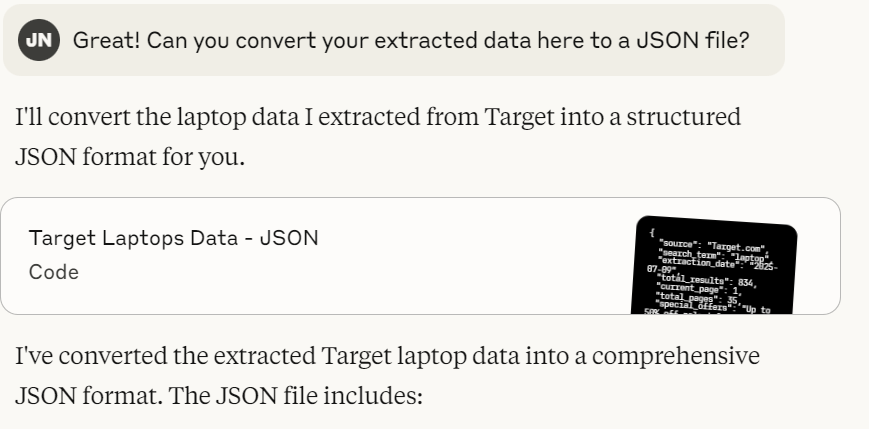
파일을 확인하면 아래 스크린샷과 유사하게 표시됩니다. Claude는 초기 작업보다 각 제품에 대해 훨씬 더 많은 세부 정보를 추출합니다.
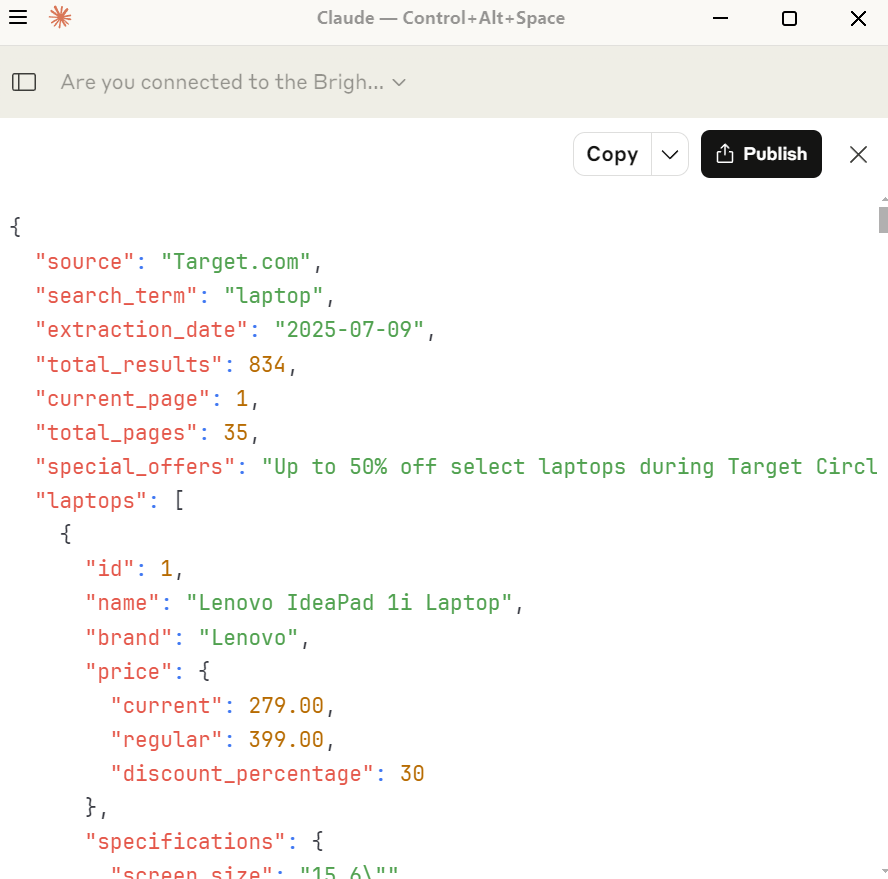
{
  "source": "Target.com",
  "search_term": "laptop",
  "extraction_date": "2026-07-09",
  "total_results": 834,
  "current_page": 1,
  "total_pages": 35,
  "special_offers": "타겟 서클 위크 기간(7/12 종료) 동안 일부 노트북 최대 50% 할인",
  "laptops": [
    {
      "id": 1,
      "name": "Lenovo IdeaPad 1i 노트북",
      "brand": "Lenovo",
      "price": {
        "current": 279.00,
        "regular": 399.00,
        "discount_percentage": 30
      },
      "specifications": {
        "screen_size": "15.6"",
        "display_type": "FHD Display",
        "processor": "Intel Celeron N4500",
        "graphics": "인텔 UHD 그래픽스",
        "memory": "4GB RAM",
        "storage": "128GB eMMC",
        "operating_system": "Windows 11 Home",
        "connectivity": "Wi-Fi 6"
      },
      "color": "회색",
      "rating": {
        "stars": 4.4,
        "total_reviews": 22
      },
      "availability": {
        "shipping": "7월 11일 금요일 도착",
        "free_shipping": true
      },
      "스폰서": true
    },
    {
      "id": 2,
      "name": "HP Essential 노트북",
      "brand": "HP Inc.",
      "price": {
        "current": 489.00,
        "regular": 599.00,
        "discount_percentage": 18
      },
      "specifications": {
        "screen_size": "17.3"",
        "display_type": "HD+ 1600×900 터치스크린 60Hz",
        "processor": "Intel Core i3-N305",
        "graphics": "인텔 UHD 그래픽스",
        "memory": "4GB RAM",
        "storage": "128GB SSD",
        "operating_system": "Windows 11 Home",
        "connectivity": "Wi-Fi 6"
      },
      "color": "Silver",
      "rating": {
        "stars": null,
        "total_reviews": 0
      },
      "availability": {
        "배송": "7월 11일 금요일 도착",
        "무료배송": true
      },
      "스폰서": true
    },
    {
      "id": 3,
      "name": "HP 15.6" FHD IPS 노트북",
      "brand": "HP Inc.",
      "price": {
        "current": 399.99,
        "regular": 669.99,
        "discount_percentage": 40
      },
      "specifications": {
        "screen_size": "15.6"",
        "display_type": "FHD IPS",
        "processor": "Intel Core i5-1334U",
        "graphics": null,
        "memory": "12GB RAM",
        "storage": "512GB SSD",
        "operating_system": null,
        "connectivity": null
      },
      "color": "Natural Silver",
      "rating": {
        "stars": 5.0,
        "total_reviews": 2
      },
      "availability": {
        "shipping": "7월 12일 토요일 도착",
        "free_shipping": true
      },
      "bestseller": true,
      "sponsored": false
    },
    {
      "id": 4,
      "name": "레노버 플렉스 5i 14" WUXGA 2-in-1 터치스크린 노트북",
      "brand": "레노버",
      "price": {
        "current": 469.99,
        "regular": 679.99,
        "discount_percentage": 31
      },
      "specifications": {
        "screen_size": "14"",
        "display_type": "WUXGA 2-in-1 터치스크린",
        "processor": "Intel Core i5-1235U",
        "graphics": "인텔 아이리스 Xe 그래픽스",
        "memory": "8GB RAM",
        "storage": "512GB SSD",
        "operating_system": "Windows 11 Home",
        "connectivity": null
      },
      "color": null,
      "rating": {
        "stars": 4.3,
        "총 리뷰 수": 3
      },
      "재고 상태": {
        "배송": "7월 11일 금요일 도착",
        "무료 배송": true
      },
      "스폰서드": false
    },
    {
      "id": 5,
      "name": "HP Envy x360 14" Full HD 2-in-1 터치스크린 노트북",
      "brand": "HP Inc.",
      "price": {
        "current": 569.99,
        "regular": 799.99,
        "discount_percentage": 29
      },
      "specifications": {
        "screen_size": "14"",
        "display_type": "Full HD 2-in-1 터치스크린",
        "processor": "Intel Core 5 120U",
        "graphics": null,
        "memory": "8GB RAM",
        "storage": "512GB SSD",
        "operating_system": "Windows 11 Home",
        "connectivity": null
      },
      "color": null,
      "rating": {
        "stars": 4.3,
        "total_reviews": 152
      },
      "availability": {
        "shipping": "7월 11일 금요일 도착",
        "free_shipping": true
      },
      "sponsored": false
    },
    {
      "id": 6,
      "name": "HP Inc. Essential 노트북 컴퓨터",
      "brand": "HP Inc.",
      "price": {
        "current": 419.99,
        "regular": 649.99,
        "discount_percentage": 35
      },
      "specifications": {
        "screen_size": "17.3"",
        "display_type": "HD+",
        "processor": "Intel Core",
        "graphics": null,
        "메모리": "8GB RAM",
        "저장공간": "256GB SSD",
        "운영체제": null,
        "연결성": null
      },
      "색상": null,
      "평점": {
        "별점": 4.4,
        "총 리뷰 수": 2222
      },
      "재고 상태": {
        "배송": "7월 12일 토요일 도착",
        "무료 배송": true
      },
      "스폰서드": false
    },
    {
      "id": 7,
      "name": "ASUS Vivobook 17.3" FHD 데일리 노트북",
      "brand": "ASUS",
      "price": {
        "current": 429.00,
        "regular": 579.00,
        "discount_percentage": 26
      },
      "specifications": {
        "screen_size": "17.3"",
        "display_type": "FHD",
        "processor": "Intel Core i3",
        "graphics": "Intel UHD",
        "memory": "4GB RAM",
        "storage": "128GB SSD",
        "operating_system": "Windows 11 Home",
        "connectivity": "Wi-Fi",
        "features": ["HDMI", "Webcam"]
      },
      "color": "Blue",
      "rating": {
        "stars": null,
        "total_reviews": 0
      },
      "availability": {
        "shipping": "7월 11일 금요일 도착",
        "무료배송": true
      },
      "스폰서": true
    },
    {
      "id": 8,
      "name": "레노버 리전 프로 7i 16" WQXGA OLED 240Hz 게이밍 노트북",
      "brand": "Lenovo",
      "price": {
        "current": 2349.99,
        "regular": 2649.99,
        "discount_percentage": 11
      },
      "specifications": {
        "screen_size": "16"",
        "display_type": "WQXGA OLED 240Hz",
        "processor": "Intel Core Ultra 9 275HX",
        "graphics": "NVIDIA GeForce RTX 5070Ti",
        "memory": "32GB RAM",
        "storage": "1TB SSD",
        "operating_system": null,
        "connectivity": null
      },
      "color": "이클립스 블랙",
      "rating": {
        "stars": null,
        "total_reviews": 0
      },
      "availability": {
        "shipping": "7월 12일 토요일 도착",
        "free_shipping": true
      },
      "category": "Gaming",
      "sponsored": false
    },
    {
      "id": 9,
      "name": "Acer 315 - 15.6" 1920 x 1080 Chromebook",
      "brand": "Acer",
      "price": {
        "current": 109.99,
        "regular": 199.00,
        "discount_percentage": 45,
        "price_range": "109.99 - 219.99",
        "regular_range": "199.00 - 404.99"
      },
      "사양": {
        "화면_크기": "15.6"",
        "디스플레이_유형": "1920 x 1080",
        "프로세서": null,
        "그래픽": null,
        "메모리": null,
        "저장공간": null,
        "operating_system": "ChromeOS",
        "connectivity": null
      },
      "color": null,
      "rating": {
        "stars": 3.8,
        "total_reviews": 69
      },
      "availability": {
        "shipping": null,
        "free_shipping": null
      },
      "condition": "제조사 리퍼비시드",
      "sponsored": false
    },
    {
      "id": 10,
      "name": "HP Chromebook 14" HD 노트북",
      "brand": "HP",
      "price": {
        "current": 219.00,
        "regular": 299.00,
        "discount_percentage": 27
      },
      "specifications": {
        "screen_size": "14"",
        "display_type": "HD",
        "processor": "Intel Celeron N4120",
        "graphics": null,
        "memory": "4GB RAM",
        "storage": "64GB eMMC",
        "operating_system": "Chrome OS",
        "connectivity": null
      },
      "color": null,
      "rating": {
        "stars": 4.1,
        "total_reviews": 40
      },
      "availability": {
        "shipping": null,
        "free_shipping": null
      },
      "sponsored": false
    },
    {
      "id": 11,
      "name": "HP 15.6" 노트북 - 인텔 펜티엄 N200",
      "brand": "HP",
      "price": {
        "current": 419.99,
        "regular": null,
        "discount_percentage": null
      },
      "specifications": {
        "screen_size": "15.6"",
        "display_type": null,
        "processor": "Intel Pentium N200",
        "graphics": null,
        "memory": "8GB RAM",
        "storage": "256GB SSD",
        "operating_system": null,
        "connectivity": null
      },
      "color": "Blue",
      "model": "15-fd0015tg",
      "rating": {
        "stars": 4.0,
        "total_reviews": 516
      },
      "availability": {
        "shipping": null,
        "free_shipping": null
      },
      "highly_rated": true,
      "sponsored": false
    },
    {
      "id": 12,
      "name": "Lenovo IP 5 16IAU7 16" 노트북 2.5K",
      "brand": "Lenovo",
      "price": {
        "current": 268.99,
        "regular": 527.99,
        "discount_percentage": 49
      },
      "specifications": {
        "screen_size": "16"",
        "display_type": "2.5K",
        "processor": "i3-1215U",
        "graphics": null,
        "memory": "8GB RAM",
        "storage": "128GB eMMC",
        "operating_system": "Chrome OS",
        "connectivity": null
      },
      "color": null,
      "rating": {
        "stars": 4.0,
        "total_reviews": 5
      },
      "재고 상태": {
        "배송": null,
        "무료 배송": null
      },
      "상태": "제조사 리퍼비시드",
      "스폰서": false
    },
    {
      "id": 13,
      "name": "Lenovo IdeaPad 3 Chrome 15IJL6 15.6" 노트북",
      "brand": "Lenovo",
      "price": {
        "current": 144.99,
        "regular": 289.99,
        "discount_percentage": 50
      },
      "specifications": {
        "screen_size": "15.6"",
        "display_type": null,
        "processor": "Celeron N4500",
        "graphics": null,
        "memory": "4GB RAM",
        "storage": "64GB eMMC",
        "operating_system": "Chrome OS",
        "connectivity": null
      },
      "color": null,
      "rating": {
        "stars": 4.1,
        "total_reviews": 19
      },
      "availability": {
        "shipping": null,
        "free_shipping": null
      },
      "condition": "제조사 리퍼비시드",
      "스폰서드": false
    },
    {
      "id": 14,
      "name": "에이서 크롬북 315 15.6" HD 노트북",
      "brand": "Acer",
      "price": {
        "current": 229.00,
        "regular": 349.00,
        "discount_percentage": 34
      },
      "specifications": {
        "screen_size": "15.6"",
        "display_type": "HD",
        "processor": "Intel Pentium N6000",
        "graphics": null,
        "memory": "4GB RAM",
        "storage": "128GB eMMC",
        "operating_system": "Chrome OS",
        "connectivity": null
      },
      "color": null,
      "rating": {
        "stars": 4.3,
        "total_reviews": 7
      },
      "availability": {
        "shipping": null,
        "free_shipping": null
      },
      "includes": "보호용 슬리브",
      "sponsored": false
    },
    {
      "id": 15,
      "name": "에이서 315 - 15.6" 크롬북 인텔 셀러론 64GB 플래시",
      "brand": "에이서",
      "price": {
        "current": 109.99,
        "regular": 219.99,
        "discount_percentage": 50,
        "price_range": "109.99 - 152.99",
        "정가 범위": "219.99 - 279.99"
      },
      "사양": {
        "화면 크기": "15.6"",
        "display_type": null,
        "processor": "Intel Celeron",
        "graphics": null,
        "memory": null,
        "storage": "64GB 플래시",
        "operating_system": "ChromeOS",
        "connectivity": null
      },
      "color": null,
      "rating": {
        "stars": 4.0,
        "total_reviews": 60
      },
      "availability": {
        "shipping": null,
        "free_shipping": null
      },
      "condition": "제조사 리퍼비시드",
      "sponsored": false
    }
  ],
  "popular_filters": [
    "게임용",
    "HP",
    "할인",
    "300달러 미만",
    "Windows"
  ],
  "가격대": {
    "최소": 109.99,
    "최대": 2349.99,
    "예산_300달러_미만": true,
    "중간_300_800달러": true,
    "프리미엄_800_플러스": true
  },
  "구매 가능 브랜드": [
    "레노버",
    "HP",
    "HP Inc.",
    "ASUS",
    "에이서"
  ],
  "operating_systems": [
    "Windows 11 Home",
    "Chrome OS",
    "ChromeOS"
  ],
  "screen_sizes": [
    "14"",
    "15.6"",
    "16"",
    "17.3""
  ],
  "notes": {
    "shipping_policy": "대부분의 상품은 1-2일 이내에 무료 배송됩니다",
    "promotion_end_date": "2026-07-12",
    "data_completeness": "총 35페이지 중 1페이지입니다"
  }
}
결론
타겟은 어렵지만 불가능하지는 않습니다. 수동으로 처리하려면 실제 브라우저, 자동 스크롤, 대기 시간, 프록시 연결을 활용한 스마트한 접근 방식이 필요합니다. 타겟의 동적 콘텐츠를 정확히 처리하는 AI 에이전트를 생성할 수도 있습니다. Bright Data의 스크래핑 브라우저와 MCP 서버는 개발자이든, AI가 복잡한 작업을 처리하도록 맡기고 싶든 상관없이 이를 가능하게 합니다.
Bright Data는 또한 결과를 원하는 저장소로 전달하는 전용 Target 스크레이퍼 API를 제공합니다.
무료 체험판에 가입하고 지금 바로 시작하세요!